
The first document in a U.S. provisional patent filing is a short cover sheet: PTO/SB/16, the USPTO’s provisional application cover sheet. It lists the invention title, the inventors and where they live, a correspondence address, entity status, which parts of the application are enclosed, and whether the U.S. government had a hand in the invention. If you want to track a patent matter from intake through grant and maintenance, that cover sheet is a natural first record.
I built sb16-patent-lifecycle-client to test one idea: read a filled SB/16 PDF entirely in the browser, turn its form fields into clean JSON, and use that parse as the first event in a patent lifecycle record. The PDF is never uploaded to a server. This post walks through how it works, what I verified locally with fictional data, and where it stops.
Status: this is a browser-only prototype at version 0.1.0. It is not a filing system, a docketing system, or a USPTO integration.
Important: nothing in this article or the repository is legal advice. The project is not affiliated with, endorsed by, or connected to the United States Patent and Trademark Office. Form layouts, field names, fees and filing rules change; anyone preparing or relying on a filing must verify it against current USPTO requirements and, where appropriate, a registered patent practitioner.
Problem
An unfiled provisional is about as sensitive as business data gets. The cover sheet itself does not describe the invention in detail, but it names the inventors, gives a working title, ties it to a docket number and correspondence address, and implies that a filing is imminent. Sending that to a third-party parsing service before the application is on file is a risk many inventors and small firms would rather not take.
Solution
Doing the work in the browser removes that step. The file is read from the local file picker into memory, parsed with a JavaScript PDF library, and the result stays in React state until the user exports it as JSON. The architecture notes in the repo describe the boundary plainly: “no persistence layer, no network upload, and no background sync.”
Architecture
The app is small: React 18, TypeScript, Vite 5, lucide-react for icons, and pdf-lib 1.17.1 for PDF handling. There are five source files: main.tsx (UI, state, upload handling, export), parser.ts (extraction, normalization, validation), types.ts (the data model), sampleData.ts (initial state), and a stylesheet. There is no router, no global store, and no backend.
pdf-lib was a reasonable choice here because it runs unchanged in the browser, reads AcroForm fields through a typed API, and does not need a worker or WASM setup. The tradeoff is size: the production build I ran produced a single 593.86 kB JavaScript chunk (229.66 kB gzipped), and Vite warns about it. The implementation notes already list dynamic import of the parser and a web worker as follow-ups.
Implementation
Reading the form: AcroForm, not XFA
Government PDF forms come in two broad flavours. AcroForm is the classic PDF form model: named fields with widgets placed on pages. XFA is an XML-based form layer that some agencies used for dynamic forms, and it is poorly supported outside Adobe’s own readers.
The parser in this project handles AcroForm only. It has no XFA code path. I checked the sample form that ships in the repo (pdf/sb0016_2.pdf) with a short pdf-lib script: it has an /AcroForm dictionary, no /XFA entry, three pages, and 58 fields (43 text fields and 15 checkboxes). So for that version of SB/16, AcroForm is the whole story. If a future version of the form, or a file re-saved by some other tool, carried only XFA data, this parser would not read it.
Extraction is short enough to show in full:
// src/parser.ts
export async function extractSb16FromPdf(file: File): Promise<PdfExtractionResult> {
  const bytes = await file.arrayBuffer();
  const doc = await PDFDocument.load(bytes, { ignoreEncryption: true });
  const form = doc.getForm();
  const fields = form.getFields();
  const rawFields: Record<string, string> = {};

  for (const field of fields) {
    rawFields[field.getName()] = readFieldValue(field);
  }

  const hasAcroFormFields = fields.length > 0;
  const normalized = normalizeSb16Fields(rawFields);
  const warnings = validateNormalizedSb16(normalized);
  ...
}
Each field is read according to its pdf-lib class. Text fields return their text, checkboxes become the string "checked" or blank, and radio groups and dropdowns return their selection. Anything else is stored as blank.
// src/parser.ts
if (field instanceof PDFTextField) return field.getText() ?? "";
if (field instanceof PDFCheckBox) return field.isChecked() ? "checked" : "";
if (field instanceof PDFRadioGroup) return field.getSelected() ?? "";
if (field instanceof PDFDropdown) return field.getSelected().join(", ");
return "";
One detail worth noting is ignoreEncryption: true. It lets pdf-lib open files that carry an encryption dictionary (common on government forms that restrict editing) instead of throwing. It does not decrypt anything, so a file that genuinely requires a password would not yield usable values.
From ugly field names to a stable schema
The raw SB/16 field names are whatever the form author typed when building the PDF. Some are descriptive, like Family Name or SurnameRow1. Others are not: the entity-status and fee checkboxes are named Check Box37 through Check Box52, and one government-interest field is called Yes the invention was made by an agency of the US Government The US Government agency name is 1.
The parser keeps two layers. rawFields preserves every name and value exactly as pdf-lib returned them. normalizeSb16Fields() then maps known names into a typed NormalizedSb16 object with an invention title, inventor list, correspondence address, entity status, application parts, government interest, signer, date, docket number and fee-payment method.
// src/parser.ts
const inventors: Inventor[] = Array.from({ length: 5 }, (_, index) => {
  const row = index + 1;
  return {
    id: `inventor-${row}`,
    givenName: text(fields, `Given Name first and middle if anyRow${row}`),
    familyName: text(fields, `Family Name or SurnameRow${row}`),
    residence: text(fields, `Residence City and either State or Foreign CountryRow${row}`),
  };
}).filter((inventor) => inventor.givenName || inventor.familyName || inventor.residence);

const entityStatus = checked(fields, "Check Box37") ? "small" : checked(fields, "Check Box38") ? "micro" : "undisclosed";
The form has five inventor rows; empty rows are dropped. Entity status and fee-payment method are derived from specific checkbox names, which is the fragile part of the whole design. Those names are tied to one version of the PDF. The parsing notes say as much: treat checkbox field names as version-specific, and keep the raw map in every export so a mismatch can be spotted and remapped later. I did not independently confirm which printed label each Check Box number sits next to; the mapping is the repository’s, and it should be checked against the current form before anyone relies on it.
Validation is intake quality, not legal review
Validation is deliberately light. validateNormalizedSb16() produces four possible warnings:
// src/parser.ts
if (!normalized.inventionTitle) warnings.push("Missing invention title.");
if (normalized.inventors.length === 0) warnings.push("No inventors were extracted.");
if (!normalized.docketNumber) warnings.push("No attorney docket number was extracted.");
if (!normalized.signerName) warnings.push("No signer name was extracted.");
Warnings are shown in the Parser State card and included in the JSON export. They never block anything. The validation doc is explicit that these are “intake-quality warnings, not legal determinations.” The app does not check whether a cover sheet is complete for filing purposes, whether fees are right, or whether entity-status claims are supportable. Those are questions for current USPTO guidance and a practitioner, not for a regex.
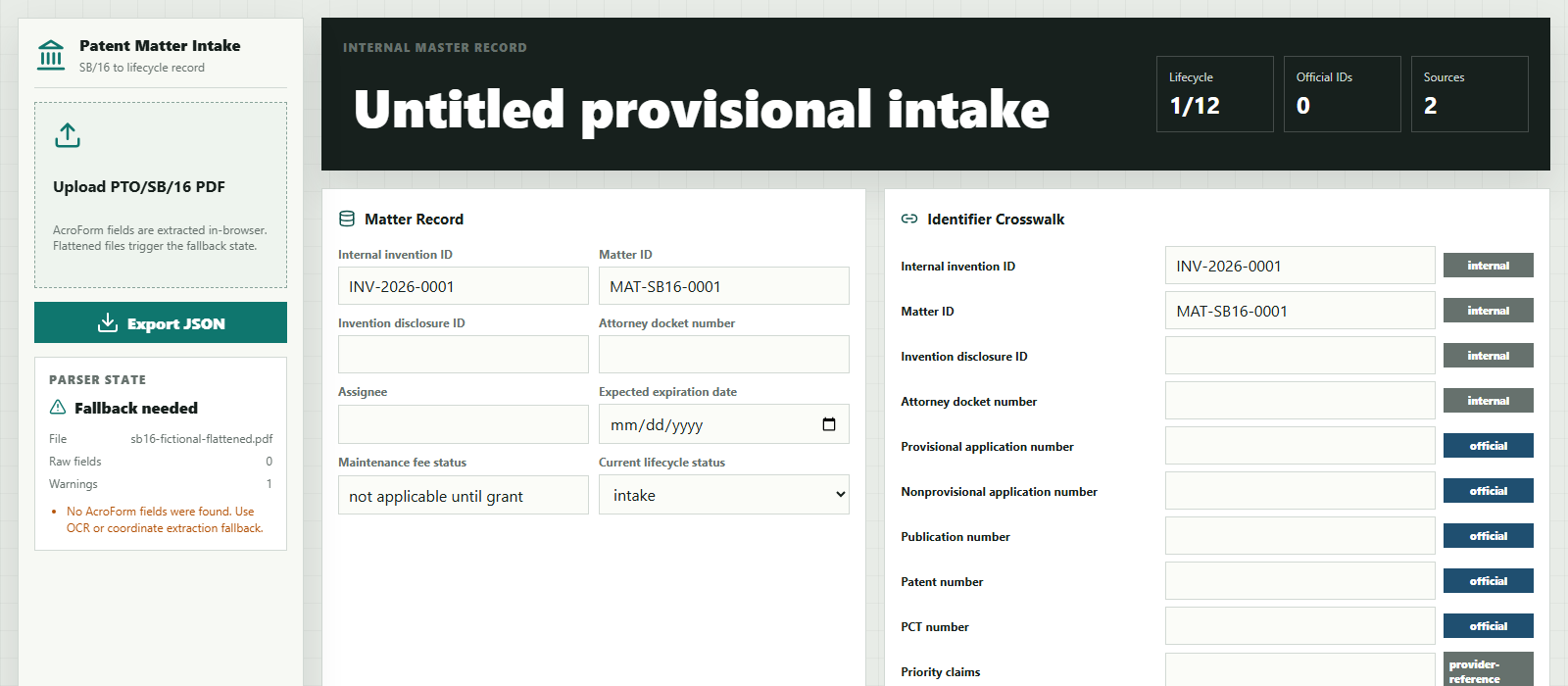
If getFields() returns nothing, which is what happens with a flattened or scanned PDF, the parser sets fallbackNeeded: true and returns a single warning recommending OCR or coordinate extraction. Neither fallback is implemented yet.
The lifecycle around the parse
Parsing is only the first step. The rest of the app is an editable patent matter record designed so that the cover sheet is one source among many over the life of the matter.
- Twelve lifecycle events. From “Provisional cover sheet parsed” through filing, publication, office action, response, allowance, issue fee, grant, maintenance windows, and expiration or abandonment. Each event has a date, a status (
complete,pendingorblocked) and links to source records. A successful upload marks the first event complete and links it to the uploaded file. - Source records. Every upload creates a
SourceRecordwith the file name, capture timestamp and raw field names, so you can later see which values came from which document. - An identifier crosswalk. This is the most opinionated part of the design. The docs argue that no single public USPTO number works as a stage-independent master key: the provisional number, nonprovisional number, publication number and patent number each belong to a stage. So the app uses internal invention and matter IDs as the master key and attaches everything else to them. Each identifier carries an authority (
internal,uspto,pct,family-provider,provider-reference) and anisOfficialLegalIdentifierflag, and the UI badges official numbers differently from provider family IDs such as EPO DOCDB, INPADOC or Google Patents groupings. - Deadline watches. A 12-month provisional conversion watch and a maintenance-fee watch exist as placeholders. Neither calculates a date yet.
- JSON export. The export bundles the matter record and the full extraction result, raw fields included, into a single downloadable file.
The enrichment sources shown in the UI (USPTO Patent Center and Open Data, Google Patents, EPO family data, PatentsView, maintenance fee status, assignment data) are labels only. Nothing in the code calls them.
Running it locally
The project runs with the standard Vite commands. I installed dependencies with npm ci --ignore-scripts, then ran npm run dev (which binds to 127.0.0.1) and npm run build. Use the blank form in pdf/ or a copy you fill with made-up data. If you try it with a real draft, remember that the JSON export contains everything the form held, and treat that file with the same care as the PDF.
Evidence
Everything in this section was run locally on 2026-10-21 against commit ce420bd.
Checking the no-upload claim
I wanted to check the no-upload claim in the architecture notes rather than repeat it. I ran the Vite dev server on 127.0.0.1, opened the app in headless Chromium with Playwright, attached a listener for every network request, and then uploaded a filled test PDF. The listener recorded zero requests between the upload and the rendered result. That is one run on one machine, not a security audit, but it matches the code: there is no fetch, no XHR, and no API client anywhere in src/.
What I ran, with fictional data
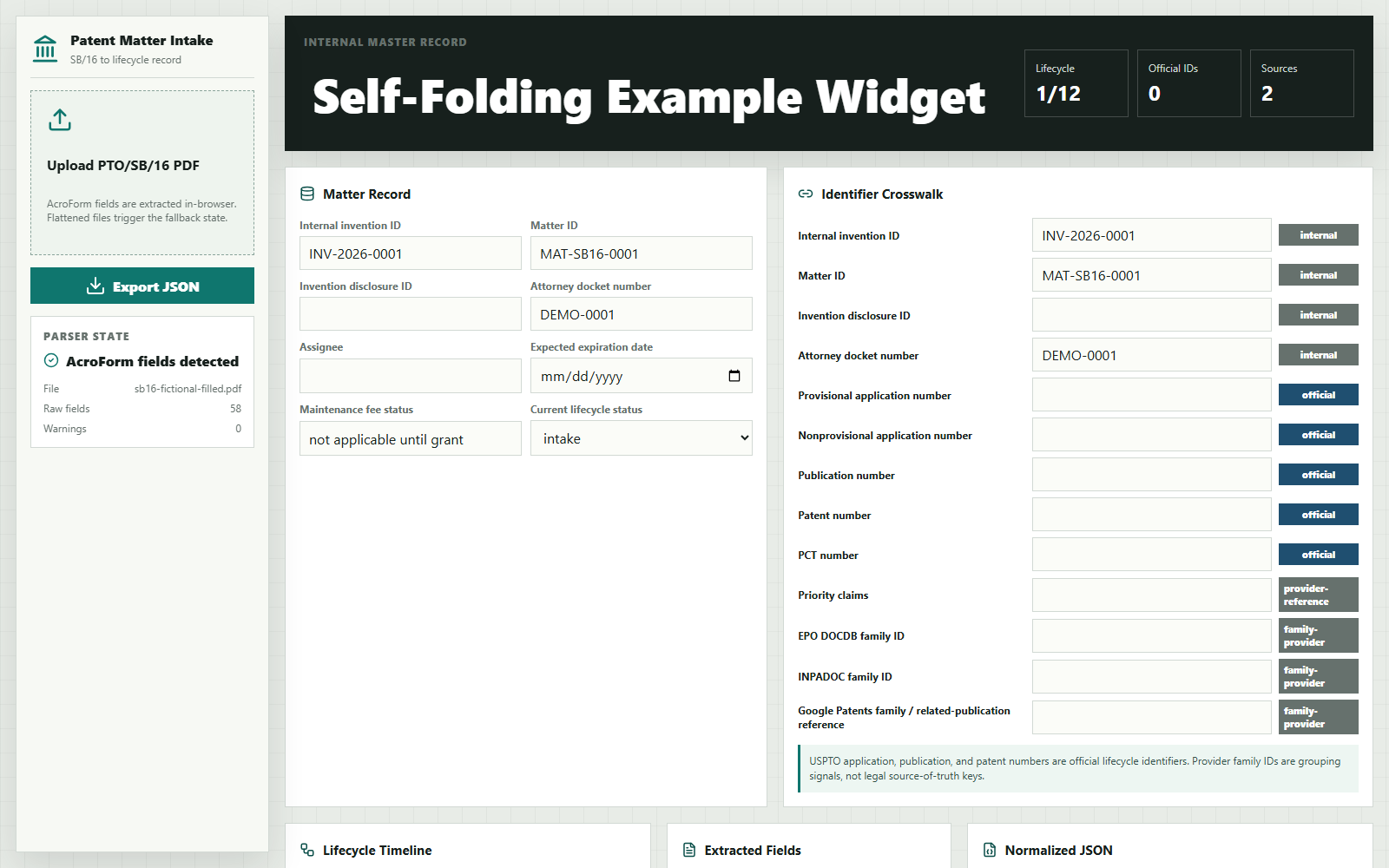
The repository has no automated test suite, so I wrote a small harness outside the repo. It bundles src/parser.ts with esbuild, fills the repo’s blank SB/16 with obviously fictional values using pdf-lib (inventors “Ada Q. Example” and “Sam Placeholder”, title “Self-Folding Example Widget (FICTIONAL SAMPLE)”, docket DEMO-0001, an example.com email), saves a flattened copy, and runs the real extraction function on all three files. These are synthetic checks, not real-world validation.
| Input (synthetic) | AcroForm detected | Raw fields | Warnings |
|---|---|---|---|
| Blank SB/16 from the repo | yes | 58 | 4 (title, inventors, docket, signer) |
| Same form filled with fictional data | yes | 58 | 0 |
| Filled form, then flattened | no | 0 | 1 (OCR / coordinate fallback needed) |
On the filled file, the normalized output contained both fictional inventors, the title, the docket number, signer and date, entityStatus: "small" (from Check Box37), drawings checked with 3 sheets, and a 12-page specification count, all matching what I put in. TypeScript compiled cleanly (tsc exit 0) and vite build succeeded with the chunk-size warning mentioned earlier.
Limitations
This is an early prototype that demonstrates a parsing approach and a data model. It is not ready to manage real patent matters. Specifically:
- Not legal advice, not USPTO-affiliated. The software makes no legal determinations and has no relationship with the USPTO. Verify every filing against current USPTO requirements.
- AcroForm only. No XFA handling, no OCR, no coordinate extraction. Flattened and scanned PDFs return a fallback state with no data.
- Version-specific mapping. Field and checkbox names are hard-coded for the included SB/16 file. A revised form could silently map checkboxes wrong; the raw-field export exists so that can be caught by review, not prevented.
- No automated tests in the repository. My checks above were a one-off synthetic harness, not part of the project.
- The fallback path still advances the timeline. In my run, uploading the flattened file still marked “Provisional cover sheet parsed” as complete and replaced the inventor list with an empty one. A real version should only complete that event on a successful parse.
- Hard-coded initial state. The built-in blank sample in
sampleData.tslists 15 fields and one warning, while actually parsing the blank PDF gives 58 fields and four warnings. It is display seed data, not parser output. - No persistence, authentication, file hashing or audit trail. Closing the tab loses everything that was not exported.
- No date math. No provisional-conversion deadline, patent term or maintenance-fee calculations.
- Fixed event model. Prosecution often involves multiple office actions and responses; the timeline has one row for each.
- Bundle size. pdf-lib is bundled eagerly into a single chunk of about 594 kB.
Resources
- CompleteTech-LLC/sb16-patent-lifecycle-client – MIT License – commit
ce420bd
Small, local-first prototypes like this one are a cheap way to test a workflow and a data model before committing to storage, accounts and integrations. If you have a document-heavy process you want to try out in the same way, that is the kind of work I do under Prototyping and MVP Development.