
QR Code Toolkit is a self-hosted QR code generator I built at CompleteTech. It does the ordinary work of turning a URL, a contact card or a Wi-Fi login into a scannable code, and it adds the part most hosted QR services charge a subscription for: dynamic codes whose destination you can change after the code is printed. It runs as one Node.js process with a React designer in front and an Express API behind it, keeps its data in a local JSON file, and can optionally hand short links to a YOURLS instance you already run.
I wanted it because a printed QR code outlives the decisions behind it. Menus change, landing pages move, campaigns end. When the redirect lives in someone else’s SaaS account, so does control of every flyer you have already printed. This post walks through how the toolkit handles static and dynamic codes, the SVG renderer, the payload formats, the YOURLS integration, and the security boundaries.
Status: this is an MVP for a single trusted operator, released under the MIT License. It is not a hardened multi-tenant service, and it has known gaps. I list them in their own section below.
Problem
Static versus dynamic QR codes
A QR code is a container for a string. A static code holds the final content: the full URL, the vCard text, the WIFI: string. Once it is printed, the content is fixed. If the URL breaks, the code breaks.
A dynamic code holds a short URL that you control. When someone scans it, your server looks up the current destination and redirects. The printed pattern never changes, but the destination can. You also get a place to count scans, because every scan passes through your redirect.
Business use cases
The cases that motivated the dynamic mode are ordinary ones:
- Printed material with a long shelf life – table tents, packaging, signage, business cards – where the landing page will move at least once.
- Seasonal or campaign links where the same printed code should point at this month’s offer.
- Menus and PDFs using the landing-page types, where the document behind the code gets replaced.
- Organizations already running YOURLS that want branded short links and QR codes from the same short-link domain, without sending scan data to a third party.
Self-hosting means you own the domain, the destination data and the scan logs. It also means you own the uptime: if the toolkit or its domain goes away, every dynamic code you printed stops working.
Solution
The toolkit models this with three modes in src/shared/types.ts: static, dynamic_url and dynamic_payload. The record-creation route in the Express server decides what string actually gets encoded:
// src/server/server.ts
const longPayload = mode === 'dynamic_payload' ? `${publicBaseUrl()}/l/${id}` : mode === 'dynamic_url' ? `${publicBaseUrl()}/r/${id}` : buildPayload(contentType, input.contentPayload);
const dynamic = mode !== 'static';
const yourls = makeYourlsClient();
const short = dynamic ? await yourls.shorten(longPayload, input.keyword, input.name) : undefined;
const encodedPayload = dynamic ? short!.shorturl : longPayload;
Static records encode the built payload directly. Dynamic URL records point at the toolkit’s own /r/:id route. Dynamic payload records, used for landing pages, point at /l/:id. In both dynamic cases the long URL is then shortened, and the short URL is what goes into the QR pattern.
Architecture
The repository is small and split by responsibility:
src/client– the React 19 designer UI, built with Vite, plus a light/dark/system theme toggle.src/qr– payload builders and validation, design presets, the SVG renderer and PNG generation.src/server– Express 5 routes, landing pages, uploads and the JSON store.src/yourls– a server-side YOURLS API client.src/shared– TypeScript types shared by client and server.
The payload builders in src/qr/payloads.ts are imported by both the browser and the server, so the live preview and the saved record use the same encoding logic. Input validation uses Zod schemas defined next to the builders.
In development, Vite serves the UI and proxies API and redirect routes to Express on port 3000. In production the same Express process serves the built UI from dist/client along with the API. Both servers bind to 127.0.0.1 by default.
Storage is a single JSON file (.local/data/db.json by default) holding four collections: QR records, audit events, uploaded assets and landing-page feedback. That is a deliberate MVP choice. It keeps setup to npm ci and a .env file, and it is also the main reason the project is single-process only.
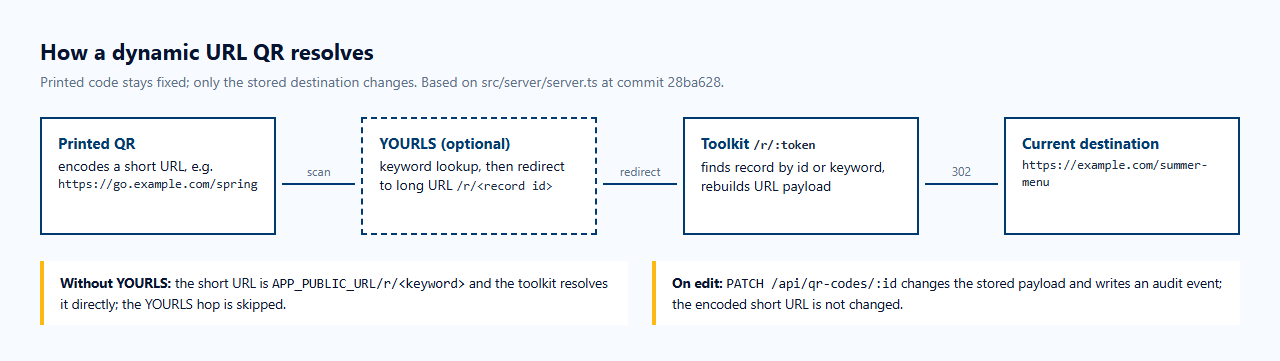
For dynamic URL codes, the redirect chain looks like this; the editable destinations section below walks through the route.
Implementation
SVG customization
The renderer in src/qr/renderer.ts asks the qrcode library for the raw module matrix at error-correction level H, then draws its own SVG. It skips the three finder patterns while drawing body modules and draws those “eyes” separately, so they can have their own frame shape and colors.
The design options include:
- Foreground, background, per-eye frame and per-eye ball colors.
- Linear or radial gradients on the body modules.
- 22 named body shapes, 15 eye frames and 18 eye balls.
- 14 templates, from Classic to CompleteTech to Bitcoin.
- 25 built-in logo icons, or an uploaded PNG, JPG, GIF or SVG logo, with an option to clear the modules behind it.
I want to be honest about the shape count. Many of the 22 names map to the same underlying drawing: in drawBodyModule, a body module is a circle, a diamond, or a rectangle with one of three corner radii. The README says this directly (“Some shape presets share an underlying rendering style”). The visual range is narrower than the list suggests.
The logo sits in a centered box 20 percent of the code’s width. Because the matrix uses level H error correction, which can recover from roughly 30 percent of the code being damaged, a centered logo of that size usually leaves the code readable. Usually is not always: the README tells you to scan-test every final export, and I agree.
QR payload formats
Getting string formats right matters: small escaping mistakes produce codes that scan but do the wrong thing. buildPayload in src/qr/payloads.ts supports URL, plain text, email (mailto: with subject and body), phone (tel:), SMS (SMSTO:), vCard 2.1/3.0, MeCard, map coordinates, Facebook and Twitter share links, YouTube, Wi-Fi, calendar events (VEVENT) and several cryptocurrency URI schemes.
Wi-Fi is a good example of why escaping matters. An SSID or password containing a semicolon would otherwise end the field early:
// src/qr/payloads.ts
case 'wifi': {
  const w = payloadSchemas.wifi.parse(raw);
  return `WIFI:S:${escapeWifi(w.ssid)};T:${w.encryption};P:${escapeWifi(w.password)};;`;
}
...
function escapeWifi(value: string): string {
  return value.replace(/([\\;,":])/g, '\\$1');
}
The test suite pins this behavior: an SSID of example;guest and a password of p:a,s must produce WIFI:S:example\;guest;T:WPA;P:p\:a\,s;;.
Audio, video, PDF, social links, app links, galleries, ratings and feedback do not fit in a QR string. For these the toolkit always uses dynamic_payload mode: the code points to a server-rendered landing page at /l/:id that shows the player, links or form. All user-supplied values on those pages pass through HTML escaping, and any URL fields are validated to be http or https before the record is saved.
Editable destinations
The core trick is that a dynamic code never encodes the destination. It encodes a short link that resolves through the toolkit’s redirect route:
// src/server/server.ts
app.get('/r/:token', async (req, res, next) => {
  const db = await store.all();
  const qr = db.qrCodes.find((item) => item.id === req.params.token || item.yourlsKeyword === req.params.token);
  if (!qr) return next(httpError(404, 'Short URL not found'));
  if (qr.mode === 'dynamic_url') {
    return res.redirect(buildPayload(qr.contentType, qr.contentPayload));
  }
  res.redirect(qr.yourlsLongUrl || qr.encodedPayload);
});
Because the destination is rebuilt from the stored payload on every scan, editing a record with PATCH /api/qr-codes/:id changes where the next scan lands without touching the encoded short URL.
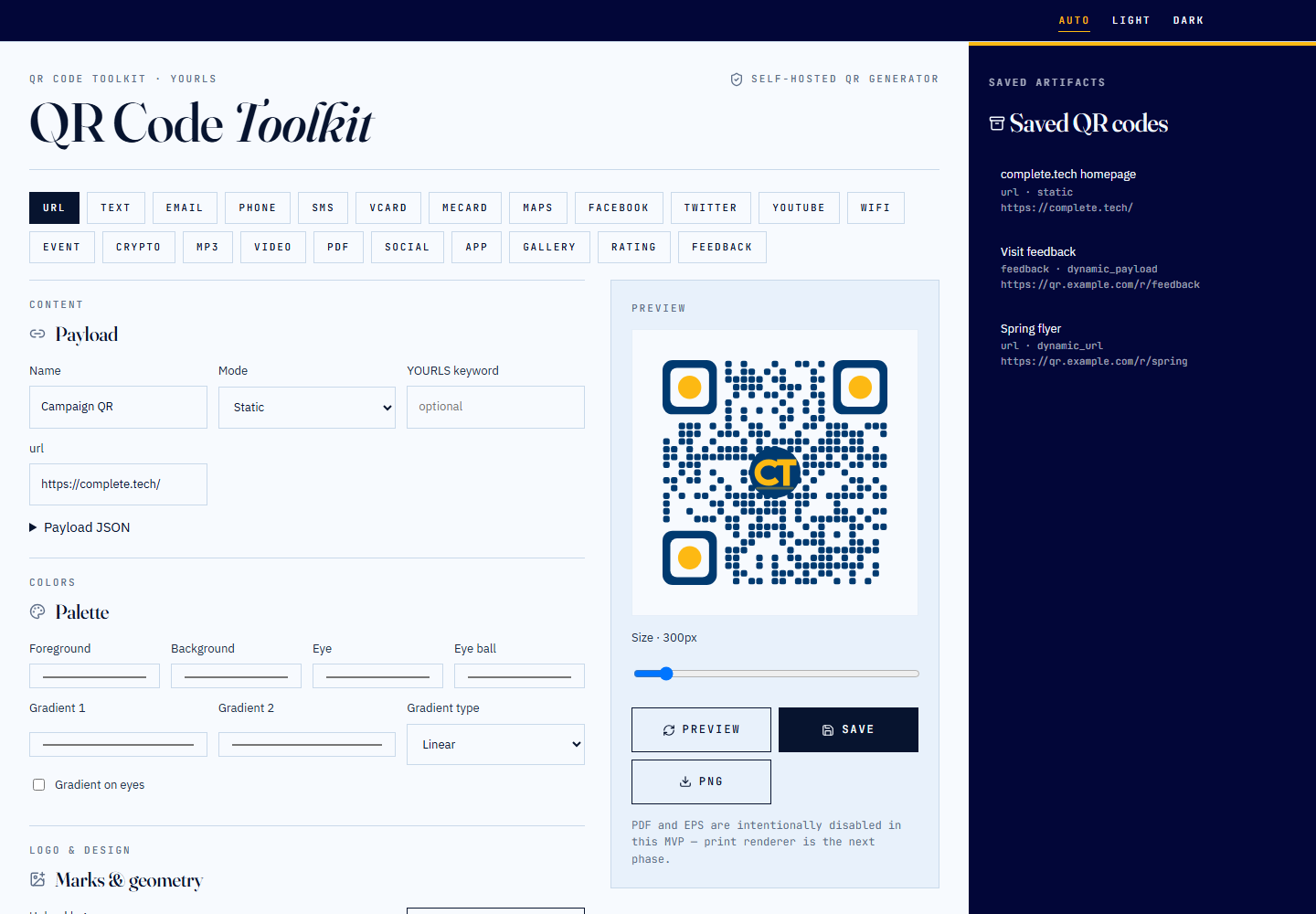
One limitation for anyone trying this from the UI: the bundled designer creates and lists records, but it does not yet have an edit form (issue #3). Changing a destination today means calling the PATCH endpoint directly.
YOURLS integration
YOURLS is a self-hosted URL shortener that many teams already run for branded short links. The toolkit can use it as the short-link layer, but it does not depend on it. src/yourls/client.ts checks whether an API URL and signature are configured. If they are not, it generates a local short link under the toolkit’s own /r/ path:
// src/yourls/client.ts
async shorten(url: string, keyword?: string, title?: string): Promise<ShortenResult> {
  if (!this.configured()) {
    const fallbackKeyword = keyword || `dev-${Math.random().toString(36).slice(2, 8)}`;
    return { keyword: fallbackKeyword, shorturl: `${this.config.shortDomain || 'http://localhost:3000/r'}/${fallbackKeyword}`, longurl: url, title };
  }
  const result = await this.request({ action: 'shorturl', url, keyword, title });
When YOURLS is configured, the toolkit asks it to shorten the toolkit’s own /r/<record id> URL, not the final destination. That is the design choice that makes editing work: YOURLS maps a branded keyword to a stable toolkit URL, and the toolkit owns the changeable part. YOURLS never needs to be updated when a destination changes. The trade-off is that the toolkit must stay reachable at that address for as long as the codes are in circulation.
The YOURLS signature is sent only from the server; the browser never sees it. Scan statistics come from YOURLS’s url-stats action when it is configured. Without YOURLS, the stats endpoint returns zero scans with "source":"dev-fallback". Scans through the local redirect are not counted.
The repository also includes a small YOURLS plugin, yourls/user/plugins/ctech-qr/plugin.php, that adds a “QR” link next to each short URL in the YOURLS admin table and a ping API action. The project describes it as a scaffold to validate against your own YOURLS deployment, and I did not run it for this article. I also did not connect to any real YOURLS server. The YOURLS request path was exercised only by the repository’s unit test, which mocks fetch.
Audit history and security
Every create and update writes an audit event with the event type, a previous snapshot and a next snapshot. The record detail endpoint returns the record together with its audit events and any landing-page feedback.
Most of the security work is about what a QR tool should never do: put attacker-controlled markup into an SVG, encode a javascript: link, or fetch arbitrary URLs from the server. These are the defenses I found in the code:
- Design input is validated before it reaches SVG markup. Colors must be six-digit hex values, and logos must be a built-in preset or a file under
/uploads/with an image extension. Unknown shape names fall back to defaults. - URL fields accept only http and https. A
javascript:URL in a record or a social landing page is rejected with a 400 before anything is stored. I confirmed the 400 against the running instance. - Uploads are size-limited and SVGs are sanitized. Uploads are capped at 2 MB and restricted to PNG, JPEG, GIF and SVG. SVGs go through DOMPurify with scripts,
foreignObject, animation elements,use,styleandhrefattributes forbidden. If DOMPurify removes anything, the upload is rejected outright rather than silently cleaned. - Uploaded files are served with a restrictive policy:
Content-Security-Policy: default-src 'none'; style-src 'unsafe-inline'; sandboxplusnosniff. - No server-side fetching of user URLs. Rendering never fetches anything, so a QR pointing at an internal address does not turn the server into a request proxy. A test asserts this.
- Optional API token and basic rate limits. Setting
ADMIN_TOKENrequires anx-admin-tokenheader on record management and upload routes. Create, update, upload and feedback routes have in-memory per-IP limits.
// src/qr/design.ts
if (color && (typeof color !== 'string' || !/^#[0-9a-f]{6}$/i.test(color))) throw new Error('Colors must be six-digit hex values');
...
if (merged.logo && (typeof merged.logo !== 'string' || !/^(#[a-z0-9-]+|\/uploads\/[a-z0-9-]+\.(png|jpg|gif|svg))$/i.test(merged.logo))) {
  throw new Error('Choose a built-in logo or an uploaded image');
}
These checks reduce the obvious injection paths. They are not a full security assessment, and the project’s own SECURITY.md says the same. The bigger boundary is operational. The app has no user accounts, and the browser UI does not send the admin token. The deployment guide says to put the management UI and API behind an authenticated reverse proxy and to expose only the public scan routes (/r/*, /l/*, /uploads/*, /samples/* and the feedback endpoint). It also warns that saved records and audit history keep whatever you encoded, including Wi-Fi passwords.
Evidence
Everything in this section was captured on 2026-10-21 at commit 28ba628.
How I tested it
I cloned the repository at commit 28ba628, installed dependencies with npm ci --ignore-scripts, and ran the checks from the CI workflow on Windows with Node.js 24.18.0:
tsc --noEmitcompleted with no errors.- Vitest: 28 tests in 4 files. The first run had 27 passing and 1 failing: the first API test hit the 10-second
beforeEachhook timeout while cold-loading the server module. An immediate second run passed all 28 in 1.55 seconds. That looks like cold-start timing on my machine, but I am reporting both runs. vite buildsucceeded, and thesmoke:qrscript wrote its sample SVG and PNG.
I then ran the production build on loopback with YOURLS left blank and APP_PUBLIC_URL set to a placeholder https://qr.example.com origin, so the codes I generated would not contain local addresses. All records and destinations in this post are synthetic test data on example.com and complete.tech URLs. I decoded every QR image shown here with zxing-cpp to confirm it reads back as https://complete.tech/.
Editing a destination
I checked destination editing end to end on a local instance with YOURLS left unconfigured. I created a dynamic_url record with the keyword spring pointing at https://example.com/spring-menu. /r/spring returned a 302 to that URL. After a PATCH to https://example.com/summer-menu, the record’s encoded payload was unchanged and /r/spring returned a 302 to the new URL.
Designer UI
Rendered SVG output
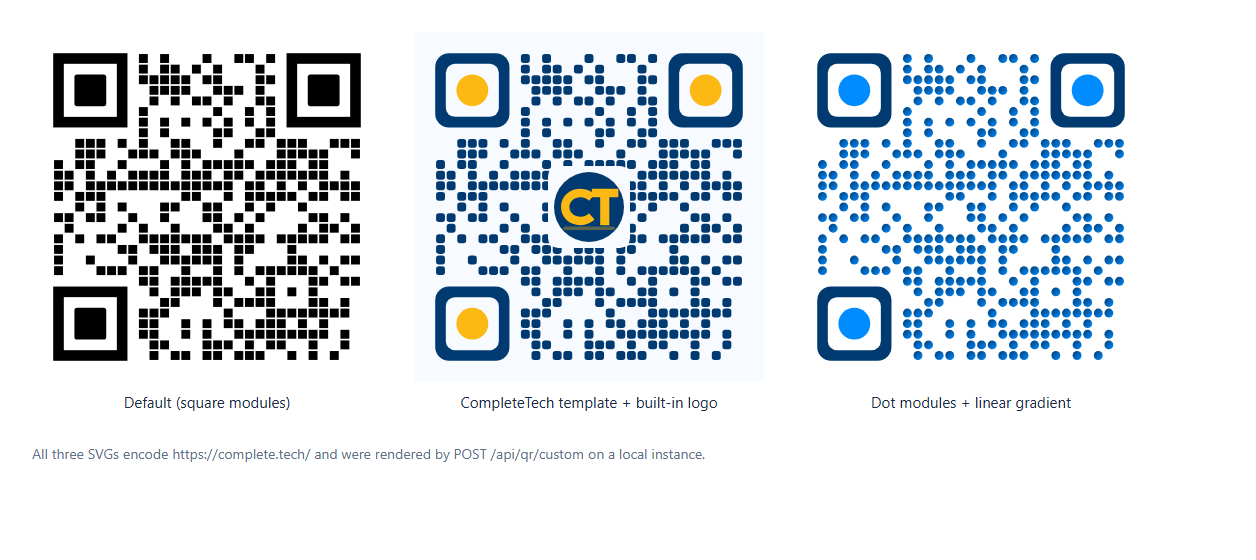
One practical observation from generating these: the SVG output draws one element per dark module. The CompleteTech-styled code for https://complete.tech/ came out at about 52 KB with 361 <rect> elements. That works, but it is less compact than merging modules into one path.
Limitations
QR Code Toolkit is an MVP (package version 1.0.0, with “MVP” used throughout the code) published as a sanitized public release. It is designed for a single trusted operator. Known limitations, from the README and from my own testing:
- Single process, JSON storage. No transactions and no multi-process safety. Back up the data file and uploads, and move to a real database before scaling.
- No user accounts or tenant isolation. Remote management needs an authenticated reverse proxy. The UI has no token login.
- No edit form in the UI. Destinations are edited through
PATCH /api/qr-codes/:id. Tracked in issue #3. - Audit snapshots (fixed on main). At the reviewed commit, the “created” event stored a reference to the live record, so later edits rewrote its
nextsnapshot. PR #1 (October 22, 2026) copies the record when each audit entry is written. - Feedback form content (fixed on main). At the reviewed commit, the rating and feedback pages posted a standard HTML form but the server parsed only JSON, so a submission returned
{"ok":true}and stored nothing. PR #1 accepts form posts and JSON, and returns a 400 for empty submissions. - Export gaps. PNG export ignores shapes, gradients and logos (issue #2). PDF and EPS are disabled; at the reviewed commit the API returned a 500 for them, and since PR #1 it returns a clean 400. Uploaded logos are referenced by URL, not embedded, so those SVGs are not portable offline.
- Design controls that do less than they suggest. The 22 shape names produce only five distinct renderings (issue #2). The “Gradient on eyes” checkbox was ignored at the reviewed commit; PR #1 makes it work and also makes gradients span the whole code, which changes how gradient templates look compared with the screenshots here.
- Statistics require YOURLS. Local redirects are not counted.
- The YOURLS plugin is a scaffold. I did not test it.
- External requests. Landing pages load Google Fonts, and user-configured media URLs are fetched by visitors’ browsers.
Resources
- CompleteTech-LLC/qr-code-toolkit – MIT License – commit
28ba628
If you want a redirect or short-link layer like this connected to your own systems, that falls under our API development and integrations work. Running the toolkit, a YOURLS instance and the reverse proxy in front of them is covered by our website hosting service.