
I wanted an AI agent to help with CRM work in Mautic: checking that the instance is up, reading and updating contacts and segments, confirming webhook event names before I design an automation, and running the occasional cache clear or segment rebuild. I did not want to hand the agent a shell on the Mautic server or a set of admin credentials and hope for the best. The result is Mautic Control, a small OpenClaw plugin that exposes six typed tools instead of open-ended access, with the riskier capabilities switched off until an operator turns them on.
This post covers which limits are enforced in code and which depend on configuration or deployment discipline. A boundary that lives in a README is not the same as one that throws before a request goes out.
Status: pre-1.0 (package version 0.1.13), MIT licensed, published on ClawHub. I tested it against Mautic Community 7.1.1 in a local Docker stack. It has not been through an independent security review, and I would treat it as beta software for trusted single-operator setups.
Solution
OpenClaw is an agent gateway that loads plugins, and plugins register tools the model can call. Mautic is an open-source marketing automation platform with a REST API under /api (and /api/v2 on newer routes). The plugin sits between the two. It is plain JavaScript: index.js registers the tools, and lib/runtime.js holds the configuration and policy logic so it can be unit-tested on its own.
The six tools are:
mautic_status– checks dashboard reachability, runs a one-record API probe, and reports the resolved configuration, transport warning, allowed console commands and workspace settings.mautic_entity– list, get, create, update or delete one of 14 mapped Mautic resources (contacts, companies, segments, campaigns, emails, forms, assets, pages, tags, users, roles, permissions, reports and webhooks).mautic_request– an escape hatch for an API path the entity mapping does not cover, restricted to paths that start with/apior/api/v2.mautic_webhook_triggers– lists the webhook event names Mautic accepts, from the fixed path/api/hooks/triggers.mautic_console– runs one of eight named Mautic console commands through an optional PHP bridge.mautic_workspace_file– lists, reads, writes or deletes files in one staging directory, for CSV or JSON imports and exports.
The repository also ships an OpenClaw skill file (skills/mautic-control/SKILL.md) that tells the agent to prefer the typed entity tool over raw requests, to read a record before changing it, to call the webhook trigger list before creating a webhook, and never to print passwords, tokens or Authorization headers. That guidance is a prompt, not a control.
Architecture
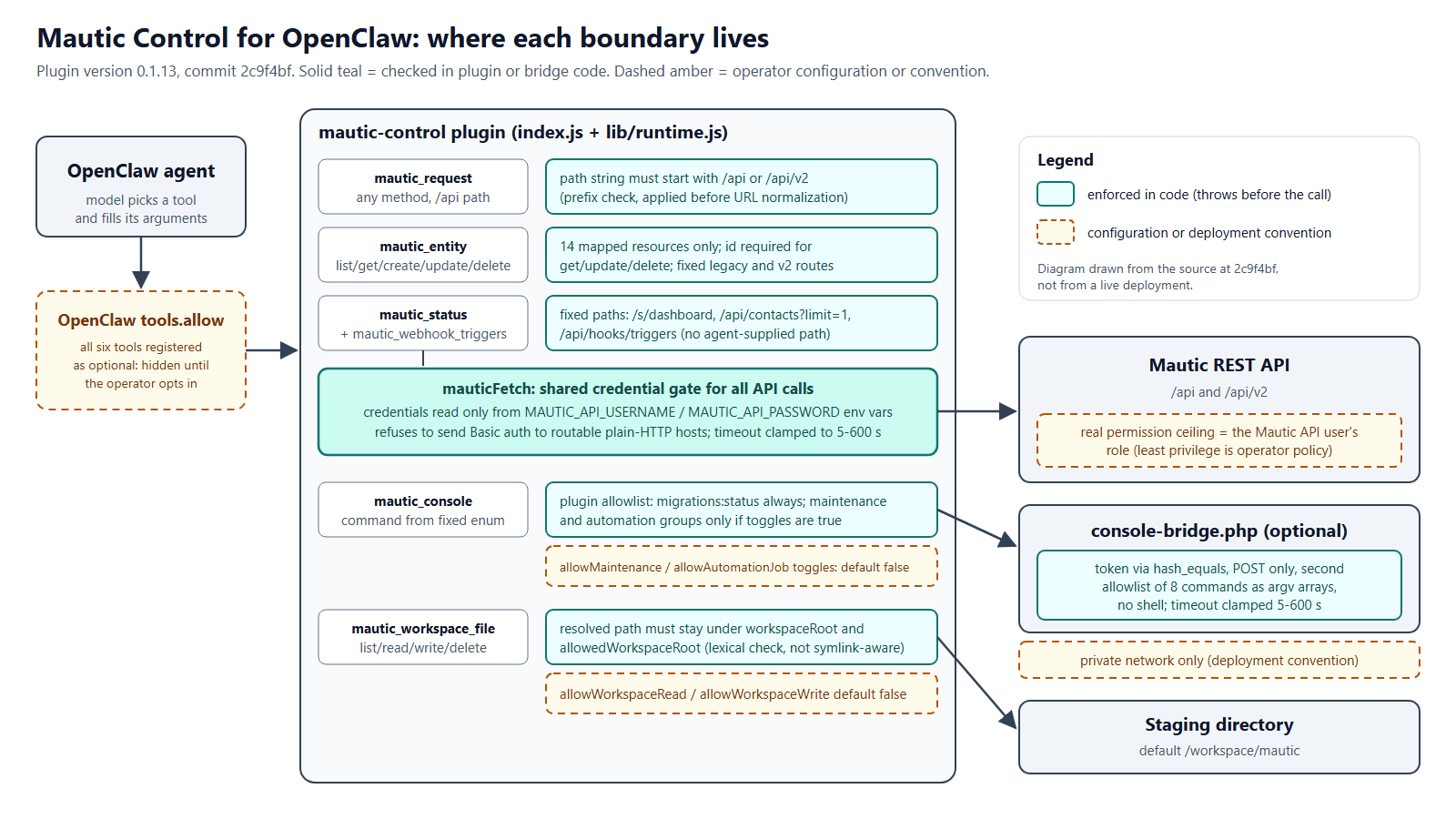
Enforced in code versus configuration
| Boundary | Where it lives |
|---|---|
| Which agents can see the tools | OpenClaw tools.allow (configuration) |
| Fixed entity list, actions, routes, required ids | Plugin code |
mautic_request limited to /api paths on the configured host |
Plugin code (prefix check; see limitations) |
| What an allowed API call may change | The Mautic user’s role (configuration) |
| Credentials from environment only; refused over routable plain HTTP | Plugin code |
| Console commands limited to eight fixed argv arrays | Plugin code and bridge code |
| Maintenance and automation commands off by default | Plugin code defaults, changed by configuration |
| Bridge reachable only from OpenClaw | Network deployment (convention) |
| Workspace paths stay under the root | Plugin code (lexical) |
| Agent reads before it updates or deletes | Skill prompt (convention) |
Implementation
Layer one: the agent has to be given the tools
Every tool is registered with { optional: true }, and the manifest marks all six as optional. According to the OpenClaw plugin tool documentation, optional tools are not exposed to the model until the user allows them through tools.allow, either by tool name or by plugin id. So the first gate is not in this plugin at all. It is an OpenClaw setting, and it is the right place to decide which agents get which tools.
The repository’s own audit notes that my local stack exposes the tools in the default context for a trusted single operator, and that OpenClaw’s deep security audit flags this with a warning (plugins.tools_reachable_permissive_policy). The documented mitigation for anything broader is a restrictive tool profile or an explicit allowlist per agent.
Layer two: typed tools instead of open-ended calls
The entity tool is the main path for CRM work. Its parameter schema uses enums for the entity name, the action and the API version, and the schema helper sets additionalProperties: false. Inside, the action is turned into a fixed method and route. For the legacy API that means POST /api/contacts/new for create, PATCH /api/contacts/{id}/edit for update and DELETE /api/contacts/{id}/delete for delete. An unknown entity throws Unsupported entity, and get, update and delete throw if no id is given.
The raw request tool exists because no fixed mapping covers every Mautic endpoint. Its one code-level restriction is the path check:
# lib/runtime.js
export function assertMauticApiPath(requestPath) {
  if (!requestPath.startsWith("/api/") && !requestPath.startsWith("/api/v2/") && requestPath !== "/api" && requestPath !== "/api/v2") {
    throw new Error("mautic_request path must start with /api or /api/v2");
  }
}
This keeps the agent from passing a full URL to another host and from casually hitting the Mautic web UI. It is a string prefix check, though, and the URL is built afterwards with the standard URL constructor, which normalizes dot segments. When I fed the helpers /api/../s/dashboard in a local probe script, the check accepted it and the built URL pointed at /s/dashboard on the same Mautic host. Entity ids are also interpolated into the route without encoding. Neither case sends credentials anywhere other than the configured Mautic host, but it does mean “API paths only” is narrower in intent than in enforcement. Checking the normalized path after building the URL, and encoding ids, would close that gap.
Update, October 22, 2026: fixed in PR #2 (merge commit 8335336). Paths are now normalized and must stay under /api, including encoded and double-encoded dot segments, and entity ids must be positive integers and are URL-encoded. The fix is on main; the published 0.1.13 ClawHub package predates it until a new release is cut.
What this layer does not do is limit what an allowed call can change. mautic_request accepts GET, POST, PUT, PATCH and DELETE, and the entity mapping includes users, roles and permissions. The real ceiling on API access is the Mautic user whose credentials the plugin holds. The README and security policy both say to use least-privilege credentials. That is good advice and it is configuration, not code.
Layer three: credentials and transport
All authenticated API calls go through one function, mauticFetch. Credentials come only from the MAUTIC_API_USERNAME and MAUTIC_API_PASSWORD environment variables. The configuration loader does not read them from plugin settings, so they cannot be typed into a plugin UI field by mistake, and they never appear in the status output. If either is missing, building the Authorization header throws. The function also masks access_token, token and password query parameters in the URL it echoes back to the agent. Response bodies are returned as Mautic sent them.
The plugin uses HTTP Basic auth, so the credentials travel with every request. In versions 0.1.11 and 0.1.12 I added a transport check that runs before any authenticated call:
# lib/runtime.js
export function assertSafeMauticTransport(config) {
  const warning = config.transportSecurityWarning ?? transportSecurityWarning(config.baseUrl);
  if (warning?.level === "critical" || warning?.level === "error") {
    throw new Error(`${warning.message} Refusing to send Mautic API credentials.`);
  }
  return warning ?? null;
}
The level comes from a companion function, transportSecurityWarning. HTTPS passes without comment. Plain HTTP to localhost, 127.0.0.1, ::1, mautic_web or any single-label hostname (the usual shape of a Docker service name) produces a warning but is allowed. Plain HTTP to anything with a dot in the hostname is marked critical, and the function above throws “Refusing to send Mautic API credentials” before the request is made. A malformed URL or a non-HTTP scheme is treated as an error and refused the same way. In my probe, http://10.0.0.5 was refused even though it is a private address, which errs on the safe side.
The heuristic is not a network policy. A single-label hostname is assumed to be private, which is true for Docker networks but is still an assumption.
Layer four: administrative operations behind two allowlists
Some Mautic jobs are console commands, not API calls: clearing the cache, reloading plugins, rebuilding campaigns, updating segments, processing queued webhooks. The plugin never runs these itself. Instead, an optional PHP file, mautic/console-bridge.php, runs inside the Mautic container on a private network and accepts POST requests.
There are two independent allowlists. On the plugin side, the tool’s parameter schema only offers eight command names, and the configuration builds a narrower list from capability toggles. migrations:status (a read-only status command) is always allowed. Cache clears and plugins:reload are added only when allowMaintenanceCommands is true. webhooks:process, campaigns:rebuild, campaigns:trigger and segments:update are added only when allowAutomationJobCommands is true. Both default to false. The tool then checks again at call time:
# index.js
        if (!config.allowedConsoleCommands.includes(params.command) || !CONSOLE_COMMANDS.includes(params.command)) {
          throw new Error("Command is not allowed by the Mautic console policy");
        }
        if (!config.consoleToken) throw new Error("MAUTIC_CONSOLE_TOKEN must be set");
On the bridge side, the PHP file compares a shared token with hash_equals, rejects anything other than POST, and maps each of the eight names to a fixed argument array (for example ['php', 'bin/console', 'mautic:segments:update', '--no-interaction']) run through Symfony Process. No shell is involved and no agent-supplied text becomes part of the command, so the agent can pick a command but cannot add arguments to it. The timeout is clamped to between 5 and 600 seconds.
# mautic/console-bridge.php
$expectedToken = getenv('MAUTIC_CONSOLE_TOKEN') ?: '';
$providedToken = $_SERVER['HTTP_X_MAUTIC_CONSOLE_TOKEN'] ?? '';

if ($expectedToken === '' || !hash_equals($expectedToken, $providedToken)) {
    http_response_code(401);
Note what the bridge does not know about: the capability toggles. It allows all eight commands to anyone holding the token. The maintenance and automation split is enforced in the plugin, so it holds only as long as the token is not usable from somewhere else. That is why the documentation insists the bridge stay on a private network, and why that requirement shows as a deployment convention in the diagram rather than a code check. The bridge is optional; without it, only mautic_console is unavailable.
Layer five: a bounded staging directory
Bulk imports and exports need somewhere to put files. mautic_workspace_file works in one directory, /workspace/mautic by default. Read (list and read) and write (write and delete) are separate toggles, and both default to false. Every path is resolved against workspaceRoot and must stay inside it and inside allowedWorkspaceRoot. The configuration loader also throws at startup if workspaceRoot itself sits outside allowedWorkspaceRoot. The unit tests cover ../secrets.txt and the sibling-prefix case where /workspace/mautic2 must not count as inside /workspace/mautic.
The check is lexical. It uses path.resolve and does not resolve symbolic links, so a symlink placed inside the staging directory that points elsewhere would be followed. The staging directory should be one nobody else writes to. The security policy also calls out the combination risk directly: an agent that can read local files and also make outbound API calls is a data-exfiltration path, which is why workspace access is off by default.
Webhook discovery
Mautic webhooks fire on named events, and a wrong name fails quietly. The mautic_webhook_triggers tool fetches the valid list so the agent can use real event names when it creates a webhook through the entity tool. The README described this tool as needing no credentials. In the code at the reviewed commit it goes through the same authenticated mauticFetch path as everything else, so it does require the API username and password. The README was corrected in PR #2.
Installing and configuring it
Installation is one command, from the README:
# README.md
openclaw plugins install clawhub:@completetech/openclaw-mautic-plugin
After that, the non-secret settings (baseUrl, consoleUrl, workspaceRoot, allowedWorkspaceRoot, defaultApiVersion, requestTimeoutSeconds and the four capability toggles) go in OpenClaw plugin config, each with an environment variable fallback. The three secrets (MAUTIC_API_USERNAME, MAUTIC_API_PASSWORD and, only if the bridge is used, MAUTIC_CONSOLE_TOKEN) go in environment variables or a secret store. A sensible starting point is to leave every toggle off, point baseUrl at an HTTPS endpoint or a private container name, give the API user only the Mautic permissions the agent’s job needs, and add the tools to one agent’s allowlist rather than the default profile.
Evidence
The unit test run below was captured on 2026-10-21 at commit 2c9f4bf.
Testing
The repository has nine unit tests in test/runtime.test.js, using Node’s built-in test runner. They exercise the pure helpers in lib/runtime.js with synthetic inputs and make no network calls: default-off capabilities, the explicit opt-in path, the three transport cases, the API path check, workspace escapes, entity route mapping and the legacy console policy. I ran them for this article on Windows with Node 24.18.0. Eight passed and one failed: the workspace test compares a resolved path to the literal string /workspace/mautic/imports/file.csv, and on Windows path.resolve returns C:\workspace\mautic\imports\file.csv. When I re-ran with Node’s path module mapped to its POSIX implementation (to match the Linux CI and container environment), all nine passed. The project’s CI runs them on Ubuntu.
The tests do not cover index.js, the PHP bridge, or any interaction with a real Mautic instance. The repository includes a live smoke script that drives the tools through an OpenClaw gateway against my local Docker stack, checking that status passes, migrations:status runs, an automation command is rejected while disabled, and a nested workspace file can be written and read back. That stack lives in a separate repository that is not public. I did not re-run the smoke test for this article, so the only results I report here are the unit tests above.
Limitations
- Pre-1.0. Version 0.1.13, tested by me against Mautic Community 7.1.1 in a local Docker stack. Validate it against your own instance, especially with custom plugins, reverse proxies or unusual API routing.
- Trusted operator assumed. The security policy states that it is not designed for hostile multi-tenant gateways where untrusted users can invoke tools.
- API path check (fixed on main). At the reviewed commit, dot segments such as
/api/../passed the prefix check and entity ids were not URL-encoded. PR #2 fixes both; the 0.1.13 ClawHub package still contains the old check until the next release. - No method or entity restrictions beyond the Mautic role. DELETE is available, and users, roles and permissions are in the entity map. Least-privilege Mautic credentials are the only limit on what allowed calls can change.
- Basic auth only. OAuth2 is not implemented. The plain-HTTP heuristic treats single-label hostnames as private.
- Bridge trusts its token. It does not apply the plugin’s capability toggles, so its safety depends on network isolation and token handling.
- Workspace guard is not symlink-aware.
- Documentation drift (fixed on main). The README said
mautic_webhook_triggersneeds no credentials, andmautic_statusthrew instead of reporting bad credentials or transport. PR #2 corrects the README and makesmautic_statusreport these as errors. - Test coverage is helper-level. Nine unit tests on synthetic inputs, one of which assumes POSIX paths. No automated tests for the tool handlers or the bridge, and the live smoke test depends on a private stack.
- No audit log of its own. The plugin does not record which agent changed which record; any trail has to come from Mautic or OpenClaw.
Resources
- CompleteTech-LLC-AI-Research/openclaw-mautic-plugin – MIT License – commit
2c9f4bf
If you are connecting an agent or assistant to a CRM or another business system and want the access narrow and reviewable, CompleteTech works on API development and integrations and chatbots and virtual assistants.