
I built this for a Linux host with an Intel Arc Pro B60 that is already managed through Cockpit, the browser-based server console. Cockpit shows CPU, memory, disk and network out of the box, but it has no idea the GPU exists. I wanted GPU utilization, GPU memory, power and temperature on the same Overview and Metrics pages I already look at, without standing up a separate monitoring stack for one card.
So I wrote cockpit-intel-gpu-overview: a small Python exporter that polls Intel’s xpu-smi tool, plus a Cockpit package that renders the result. This post walks through where the numbers come from, how the pieces fit, what the installer changes on the host, and what it does not do.
Status: a personal, single-host tool. The README says it was written for one Arc Pro B60 on one apt-based Linux system, and the code hard-codes that host’s device paths. It has no automated tests. Treat it as a working example, not a packaged product. Intel and Arc are trademarks of Intel Corporation; this project is not affiliated with or endorsed by Intel.
Problem
Why a Cockpit plugin
The obvious alternative was Intel’s full XPU Manager daemon, which offers REST and Prometheus-style export, feeding a Prometheus and Grafana setup. That is the right answer for a fleet. For one box it is a lot of moving parts, and I was not looking for long-term retention or alerting. I wanted a glance: is the GPU busy, how much memory is in use, how hot it is running.
Cockpit was already installed and already the place I check a host. Cockpit packages are plain HTML and JavaScript served by the Cockpit web service, and the cockpit.file() API lets a page watch a file on the host and get callbacks when it changes. That makes a very simple contract possible: something privileged writes a JSON file, and the browser reads it.
There is also a packaging constraint. The README notes that Intel’s full xpumanager package conflicts with xpu-smi, so you install one or the other. This host uses xpu-smi from Intel’s graphics package feed, and the exporter is built around it.
Solution
The repository has three parts:
- A root-owned systemd service,
cockpit-intel-gpu-exporter, that pollsxpu-smievery two seconds and writes/run/cockpit-intel-gpu/metrics.jsonplus a per-minutehistory.json. - A Cockpit package named
intel-gputhat adds a “GPU” page to the Cockpit menu, and two scripts injected into Cockpit’s own Overview and Metrics pages to add GPU cards there. - The third-party Cockpit Sensors package with
lm-sensors, which the installer adds for host temperature, fan and voltage readings from the kernel hwmon stack. The exporter does not read from it; it sits alongside.
Architecture
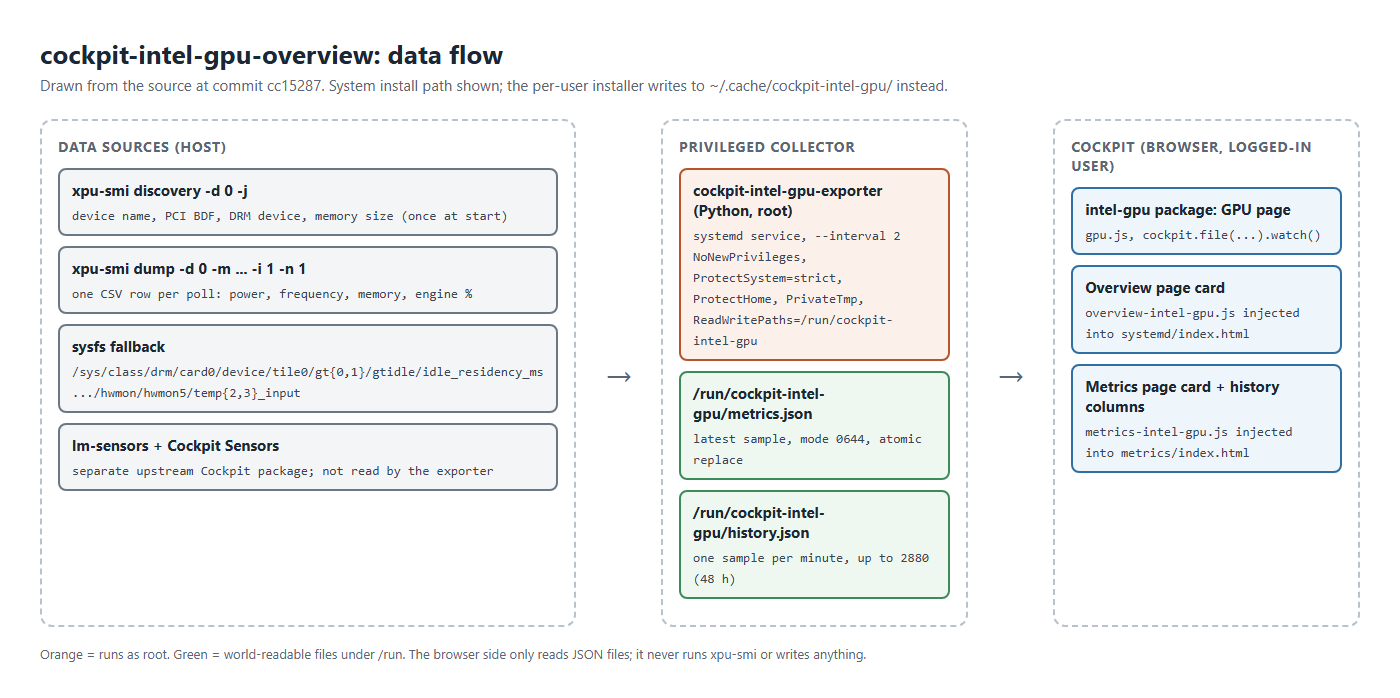
The split is the main design decision. Everything that needs privilege lives in one short Python file under systemd. Everything in the browser is unprivileged and read-only: it never runs xpu-smi, never calls a privileged Cockpit channel, and never writes to the host.
Implementation
Where the numbers come from
At startup the exporter calls xpu-smi discovery -d 0 -j once to get the device name, PCI address, DRM device and physical memory size. If the JSON form fails, it falls back to regex-parsing the plain-text table. Then, on every poll, it runs xpu-smi dump -d 0 -m <metric list> -i 1 -n 1, which prints a CSV header and a single sample row.
The parser does not rely on column positions. It finds the line starting with Timestamp,, reads it with csv.DictReader, and looks fields up by their header text, accepting more than one spelling for the engine columns:
# src/exporter/cockpit-intel-gpu-exporter.py
    return {
        "timestamp": row.get("Timestamp", "").strip(),
        "device_id": row.get("DeviceId", "").strip(),
        "utilization_percent": first("Average % utilization of all GPU Engines"),
        "power_watts": first("GPU Power (W)"),
        "frequency_mhz": first("GPU Frequency (MHz)"),
        "temperature_c": first("GPU Core Temperature (Celsius Degree)"),
        "memory_util_percent": first("GPU Memory Utilization (%)"),
        "memory_used_mib": first("GPU Memory Used (MiB)"),
        "compute_percent": first("Compute Engine 0 (%)", "Compute Engine (%)"),
        ...
Any value of N/A, an empty string, or something that will not parse as a float becomes null in the JSON, and the UI shows -- for it. That matters, because not every field is populated every time.
sysfs fallbacks
Two fields have a second source. If xpu-smi returns no overall utilization, the exporter computes it from the kernel’s GT idle-residency counters. It reads tile0/gt0 and tile0/gt1 gtidle/idle_residency_ms under /sys/class/drm/card0/device immediately before and after the one-second xpu-smi dump, and treats the time not spent idle as busy:
# src/exporter/cockpit-intel-gpu-exporter.py
    busy = []
    for old_idle, new_idle in zip(before["idle_ms"], after["idle_ms"]):
        idle_delta = max(0, new_idle - old_idle)
        busy.append(100 - min(100, (idle_delta / elapsed_ms) * 100))
    if not busy:
        return None
    return max(0, min(100, max(busy)))
It reports the busier of the two GTs rather than an average. That is a reasonable “is anything working” signal, but it is not the same quantity as Intel’s “average utilization of all engines”, so the two sources are not directly comparable.
If xpu-smi returns no core temperature, the exporter reads temp2_input or temp3_input from hwmon/hwmon5 under the same device and divides by 1000. The hwmon index is hard-coded. hwmon numbering is assigned at boot and can differ between machines, so this path is specific to the host it was written on.
What is and is not on the page
The fields the exporter knows how to extract are: overall GPU utilization, power in watts, GPU frequency, core temperature, memory used and memory utilization, total memory from discovery, and per-engine utilization for compute, render, copy, decoder and encoder (engine 0 of each, or the unsuffixed column).
Things it does not collect: fan speed, memory temperature, PCIe throughput, ECC or RAS error counters, per-process GPU usage, throttle reasons, and anything about a second GPU. Some of these may be available from xpu-smi on this card; the exporter simply does not ask for or parse them.
I cannot give a definitive list of which fields the B60 actually populates through xpu-smi, because I have no card to check against for this write-up and the repository does not include captured output. What the code tells you is indirect: the sysfs fallbacks exist specifically for utilization and temperature, and the README says the exporter runs as root because, on this host, those two metrics require access to the Intel MEI device. Read that as “these fields needed extra work here”, not as a statement about every B60 or driver version.
How the UI reads the data
The GPU page is a static index.html with placeholders and a short gpu.js. On load it asks Cockpit for the current user, then watches the system metrics file. If that file is missing on the first callback, it falls back to the per-user location written by the alternative user-level installer:
# src/cockpit/gpu.js
  function watchMetrics(paths, index) {
    if (file) {
      file.close();
    }
    file = cockpit.file(paths[index], { syntax: JSON });
    let initial = true;
    file.watch((content, tag, error) => {
      if ((error || content === null) && initial && index + 1 < paths.length) {
        watchMetrics(paths, index + 1);
        return;
      }
      initial = false;
      ...
      render(content);
    });
  }
Because the exporter replaces the file atomically (write to a temp file in the same directory, chmod 0644, then os.replace), the watcher never sees a half-written JSON document.
The Overview and Metrics integrations work differently. Cockpit’s own pages are React applications, and there is no extension point for adding a card. The installer instead adds one <link> and one <script> tag to /usr/share/cockpit/systemd/index.html and /usr/share/cockpit/metrics/index.html. The injected scripts use a MutationObserver on the document; whenever Cockpit re-renders, they find the card gallery by CSS class (.ct-system-overview or .pf-v5-l-gallery on Overview, .current-metrics on Metrics) and append a card titled “Intel Arc Pro B60” if it is not there. Renders are coalesced through requestAnimationFrame.
On the Metrics page, the script also adds “GPU” and “GPU memory” columns to Cockpit’s per-minute history grid. It parses each hour block’s start time from its element id (metrics-hour-<ms>), looks up the matching minute in history.json, and sets a bar height. The exporter keeps one history entry per minute (later samples in the same minute overwrite earlier ones), skips failed polls, and trims to 2,880 minutes, which is 48 hours.
This approach is effective and fragile in equal measure. It depends on PatternFly v5 class names and on Cockpit’s internal DOM structure, neither of which is a public API.
Installation
On the target host, from the repository root:
# README.md
sudo ./scripts/install.sh
Then refresh the Cockpit tab. It is worth knowing exactly what that script does before running it as root:
- Warns, but continues, if
xpu-smiis not on the PATH. - On apt hosts, runs
apt-get updateand installsca-certificates,lm-sensors,wgetandxz-utils; on non-apt hosts it exits unlesssensorsis already present. It then runssensors-detect --autoand tries to load thek10temp,drivetempandnct6775kernel modules. - If
/usr/share/cockpit/sensorsdoes not exist, downloads the latest Cockpit Sensors release tarball from GitHub and installs it there, with a marker file so the uninstaller knows it owns that directory. - Installs the exporter to
/usr/local/libexec/, the unit to/etc/systemd/system/, and theintel-gpupackage to/usr/local/share/cockpit/intel-gpu/. - Backs up Cockpit’s Overview and Metrics
index.htmlfiles (once) with a.cockpit-intel-gpu.baksuffix, copies the two injected scripts and stylesheets next to them, and adds the tags. - Enables and restarts the exporter, and restarts
cockpit.socketif it is running.
sudo ./scripts/uninstall.sh reverses this: it stops and removes the service, removes the package and injected files, removes Cockpit Sensors only if the marker file says this installer put it there, and restores the backed-up index.html files (or strips the tags if no backup exists). It does not remove lm-sensors or the other apt packages.
There is also scripts/install-user.sh, which runs without sudo. It copies Cockpit’s systemd and metrics packages into ~/.local/share/cockpit/ and patches those copies, installs the exporter as a systemd user service writing to ~/.cache/cockpit-intel-gpu/, and strips the manifest’s path-exists condition. On a host where GPU metrics need root, the user-level exporter will likely produce partial or failed samples, so I treat it as a development path.
Permissions and security
Running a collector as root is the part I thought about most. The systemd unit applies the standard hardening switches so that the root process has as little room as practical:
# systemd/cockpit-intel-gpu-exporter.service
RuntimeDirectory=cockpit-intel-gpu
RuntimeDirectoryMode=0755
NoNewPrivileges=yes
PrivateTmp=yes
ProtectHome=yes
ProtectSystem=strict
ReadWritePaths=/run/cockpit-intel-gpu
With ProtectSystem=strict the file system is read-only to the service except for its own runtime directory. The exporter runs fixed argument lists with no shell and takes no input from the browser, so there is no path from a Cockpit page to a command on the host. The UI injects HTML only from constant strings and writes telemetry values with textContent.
Some trade-offs are worth stating plainly:
- The metrics and history files are mode
0644in a0755directory, so any local user can read GPU telemetry. That is a deliberate choice to let Cockpit read them as the logged-in user; it is not suitable where GPU activity itself is sensitive. - The service still runs as root. The hardening reduces what it can change, not what it can read. A narrower option would be a dedicated user with group access to the specific device nodes; I have not tested that.
- The installer fetches the “latest” Cockpit Sensors release over HTTPS with no pinned version or checksum. That is a supply-chain dependency on a third-party repository at install time. Pinning a release and verifying a hash would be the stronger choice.
- Editing files under
/usr/share/cockpit/means a Cockpit package upgrade can overwriteindex.htmland silently drop the Overview and Metrics cards. The standalone GPU page lives in/usr/local/share/cockpit/and is not affected. Re-running the installer restores the tags; the backup is only created once, so it reflects the version present at first install.
Evidence
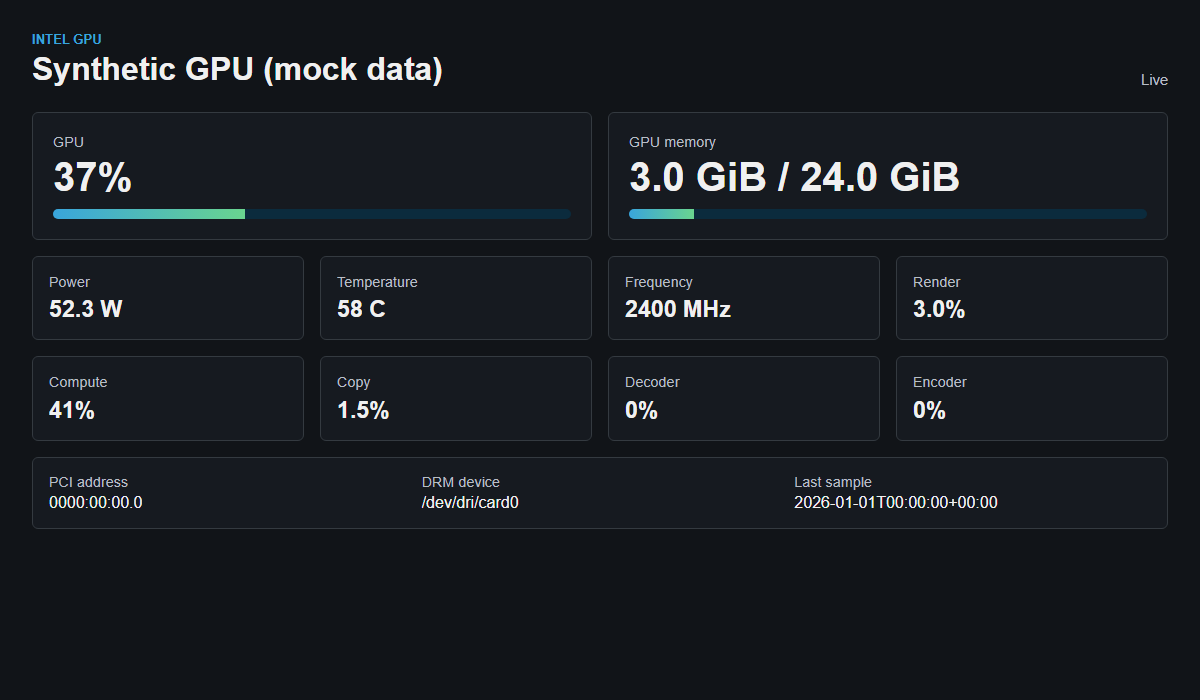
cockpit.js feeding one synthetic payload. Every number here is made up; this is not a capture from real hardware.The repository has no test suite and no CI configuration. For this article I did two local checks at commit cc15287 on 2026-10-21, without any Intel hardware:
- I imported the exporter module and fed
parse_dumpa synthetic CSV I wrote using the column names the parser looks for. It produced the expected values, turnedN/Aintonull, and raisedValueErroron header-only output. The idle-residency function returned 75% for a synthetic case where the busier GT was idle 250 ms out of 1,000. Two history writes in the same minute produced one entry, and a failed payload did not add one. - I rendered the GPU page in headless Chromium with a stub standing in for Cockpit’s JavaScript API, which produced the screenshot above.
Neither check exercises xpu-smi, real sysfs files, or Cockpit itself. The repository’s history and README describe it running on the author’s host, but I do not have logs or captures from that host to cite, so I am not claiming hardware validation here.
Limitations
This is a single-host tool that works for the machine it was written on. Before using it elsewhere, expect to change code:
- One GPU only. Device id
0,/sys/class/drm/card0andhwmon5are constants. On a system with an integrated GPU or a second card, card0 may be the wrong device and the fallbacks will read the wrong data or nothing. - Hard-coded name. The Overview and Metrics cards are titled “Intel Arc Pro B60” regardless of what discovery reports.
- Depends on Cockpit internals. The injected scripts rely on PatternFly v5 class names and Cockpit’s page structure. A Cockpit update can break them or remove them.
- apt only. The system installer targets apt-based distributions; other distributions need manual steps.
- Short-lived history. History is two metrics (utilization and memory) at one-minute resolution for 48 hours, stored under
/run, so it is lost on reboot. There is no alerting. - Discovery runs once. Device details are read at service start; if
xpu-smiwas unavailable then, they stay empty until the service restarts. - README drift. The README says the Overview script inserts GPU rows into the Usage card. The current script removes those legacy rows and adds a standalone card instead.
- No tests, no CI, no packaging. There is no .deb or RPM, and no test suite.
If I extend it, the first changes would be discovering the DRM card and hwmon index from the PCI address rather than hard-coding them, taking the card title from discovery, pinning the Cockpit Sensors download, and adding fixture-based tests for the parser using captured xpu-smi output.
On the services side, this kind of small, host-level visibility work falls under website hosting and infrastructure. If you are planning on-premises GPU hardware for model workloads, the AI-driven analytics service page describes that side of the work.
Resources
- CompleteTech-LLC/cockpit-intel-gpu-overview – MIT License – commit
cc15287