
Moving an on-premises ManageEngine ServiceDesk Plus installation to ServiceDesk Plus Cloud is usually planned around one number: how many tickets there are. That number tells you very little. Whether a migration goes smoothly depends on things like how many portals the installation runs, which modules each portal uses, how much history has to come across, how large the attachments are, and which templates, SLAs and workflows have to be rebuilt by hand on the other side.
I built SDP Cloud Readiness so I could answer those questions before a migration project starts. It is a local, read-only Python tool. It takes inventory of an on-premises ServiceDesk Plus environment through the documented V3 REST API, checks what it finds against the vendor’s published migration limitations, and writes offline HTML, Markdown, JSON and CSV reports. Every gap in what it could see stays in the report as a gap. It is an independent tool, not a ManageEngine product or a migration utility.
Status: version 2.2.0. I tested it with an extensive synthetic test suite and fixtures. It has not been certified against every ServiceDesk Plus build, and its reports do not approve a migration. Every screenshot in this post comes from the tool’s synthetic demo mode, not from a real installation.
Problem
Why on-premises to Cloud is not a lift-and-shift
ManageEngine publishes a migration process, a list of data it migrates and a list of migration limitations for moving from on-premises ServiceDesk Plus to Cloud. The analyzer cites those pages directly (sdp_audit/sources.py lists them with a review date of 5 October 2026). Reading them next to a real environment shows the usual pressure points:
- History. Old records and their audit detail need an agreed disposition. A ticket count cannot confirm that history survived.
- Attachments. The analyzer checks per-owner attachment totals against a 48 MB threshold. It checks both the decimal and the binary reading of that number, because the documentation does not say which one applies.
- Additional fields. Cloud enforces limits on field counts and value sizes. Some option characters are stripped during migration.
- Configuration. SLAs, request lifecycles, change workflows, form scripts and query reports are not data you copy. They have to be mapped to a target equivalent and tested.
- Scope. CMDB, Releases and custom modules each need explicit migration handling.
The other problem is visibility. An ESM installation can run several portals (IT, HR, Facilities and so on), and an API key only sees what its account can see. A tool that reports zero for everything it could not read makes the migration look simpler than it is. Most of the design effort went into not doing that.
Solution
You run it from a Windows machine (or anywhere with Python 3.10+) that can reach the on-premises server. You give it the server URL and an integration API key. It then:
- Tries to discover the portals visible to that key with
GET /portals. - Reads a fixed set of inventories in each selected portal: incident and service templates, sites, support groups, technicians, users, query reports, CI types, asset modules, requests, changes, problems, projects, releases, assets, computers, CIs, contracts and purchase orders. It also collects the organization-wide user directory once.
- Reads a bounded sample of record details and child records (request notes, tasks and worklogs) and module-aware field metadata.
- Runs the collected data through a dated rule set and produces per-portal findings, an environment-wide rollup, coverage tables and seven vendor/project questions.
Architecture
Everything runs inside one shared request scheduler. By default that means 30 requests per minute, one request in flight, 500 total HTTP attempts and a 20-minute wall-clock budget. Retries, metadata reads and every portal draw from the same budget, and the tool honors HTTP 429, SDP code 4015 and Retry-After. These defaults are the tool’s own safety policy, not a vendor quota.
Multi-portal discovery without guessing
Portal discovery turned out to be the hardest part. In my review I could not find a portal-list operation in the public ManageEngine on-premises V3 guide or the official Postman collection. The /portals contract the tool uses is documented by a third-party integration maintainer (Netskope’s ServiceDesk Plus plugin documentation), and the tool says so in every report. Some installed builds deny or do not support that call.
When discovery fails, the tool does not try portal IDs 1, 2, 3 and so on, and it does not fall back to the key’s implicit default portal. It stops issuing portal-scoped reads until it has real IDs. You can supply them as a verified list, in a host-bound JSON file, or by retrying discovery with a separate directory-only key that the transport restricts to GET /portals. With consent, it can remember a verified portal list for that host. It never stores keys. A saved list is labeled as user-supplied evidence, not as a complete directory.
Version 2.2.0 added per-instance credentials. In ESM environments, different portals are often administered by different teams with different keys. You can assign a key to each portal through secure prompts, a credential file of environment-variable references, or a local .env with 20 numbered key/portal-ID slots bound to one host. A portal with no assigned key is reported as unassessed. The tool never silently reuses another portal’s key for it.
Coverage gaps are findings, not zeros
The tool tracks each collection’s outcome separately, per portal. A COMPLETE list means pagination finished for that key, portal and filter. EMPTY means a successful, complete read returned nothing. PERMISSION_DENIED, MODULE_NOT_AVAILABLE, ENDPOINT_UNSUPPORTED, PORTAL_NOT_ACCESSIBLE, RECORD_LIMIT_REACHED, REQUEST_BUDGET_REACHED and the other states each record why coverage is missing. In each of those cases the record count is unknown, not zero.
I tried to keep classifications only as specific as the evidence supports. A generic HTTP 403 is recorded as a denied operation. It does not tell you which role is missing, and the report says so. A 404 is an endpoint or object compatibility gap, not proof that a module is unlicensed. SDP code 7001 (“not allowed as per current license”) is kept separate from an ordinary denial. The tool does not record arbitrary server response text, because error bodies can contain data that shouldn’t end up in a report.
Field metadata gets the same care. ServiceDesk Plus does not have one universal “list all custom fields” read. The tool uses module-specific strategies, such as /requests/metainfo per observed template, Asset and CI-type metadata from their own type catalogs, and /udf_fields only with the documented Space module selectors. For modules with no verified definition endpoint (Problems, Projects, Releases and several others), field names seen in records are reported as inferred, incomplete evidence.
Implementation
Read-only by construction
If I am going to point a tool at someone’s production service desk, I want “read-only” enforced in code, not just stated in a README. The transport layer in sdp_audit/transport.py only issues GET requests. It checks every path against an explicit allowlist, rejects credential parameters in query strings, and refuses to follow redirects, so the API key header can never be carried to a Location target:
# sdp_audit/transport.py
class _NoRedirectHandler(urllib.request.HTTPRedirectHandler):
    def redirect_request(self, req, fp, code, msg, headers, newurl):
        # Returning None makes urllib raise HTTPError. The authtoken must never
        # be carried to a Location destination, including the same origin.
        return None
...
        if not any(pattern.fullmatch(path) for pattern in self._allowed) and (path, portal_id) not in self._dynamic_metadata_paths:
            raise ValueError("The API path is outside the explicit read-only allowlist.")
The allowlist is built from the resource catalog, plus a short list of documented sub-resource reads. Record IDs must be ASCII digits, and there is no catch-all /api/v3/.* pattern:
# sdp_audit/catalog.py
    # Explicitly documented Request Note GET list/detail operations.
    r"/requests/[0-9]+/notes(?:/[0-9]+)?",
    # Formal task GET list/detail operations in the four public on-prem guides.
    r"/(?:requests|changes|projects|releases)/[0-9]+/tasks(?:/[0-9]+)?",
    # GET worklog list/detail: vendor Request Admin V1 -> V3 migration notice.
    r"/requests/[0-9]+/worklogs(?:/[0-9]+)?",
    # Asset attachment metadata list, excluding downloads and attachment data.
    r"/asset_assets/[0-9]+/attachments",
The key is sent only in the authtoken header. It is entered through a masked dialog, a hidden console prompt or an environment variable, never as a command-line argument, and it is redacted from responses, logs and reports. Raw ticket descriptions, note bodies, attachment contents and unnecessary personal fields are left out of the reports. The reports still contain internal structure, portal names, identifiers and counts, so the documentation tells you to review them before sharing.
Migration checks: history, attachments, templates and SLAs
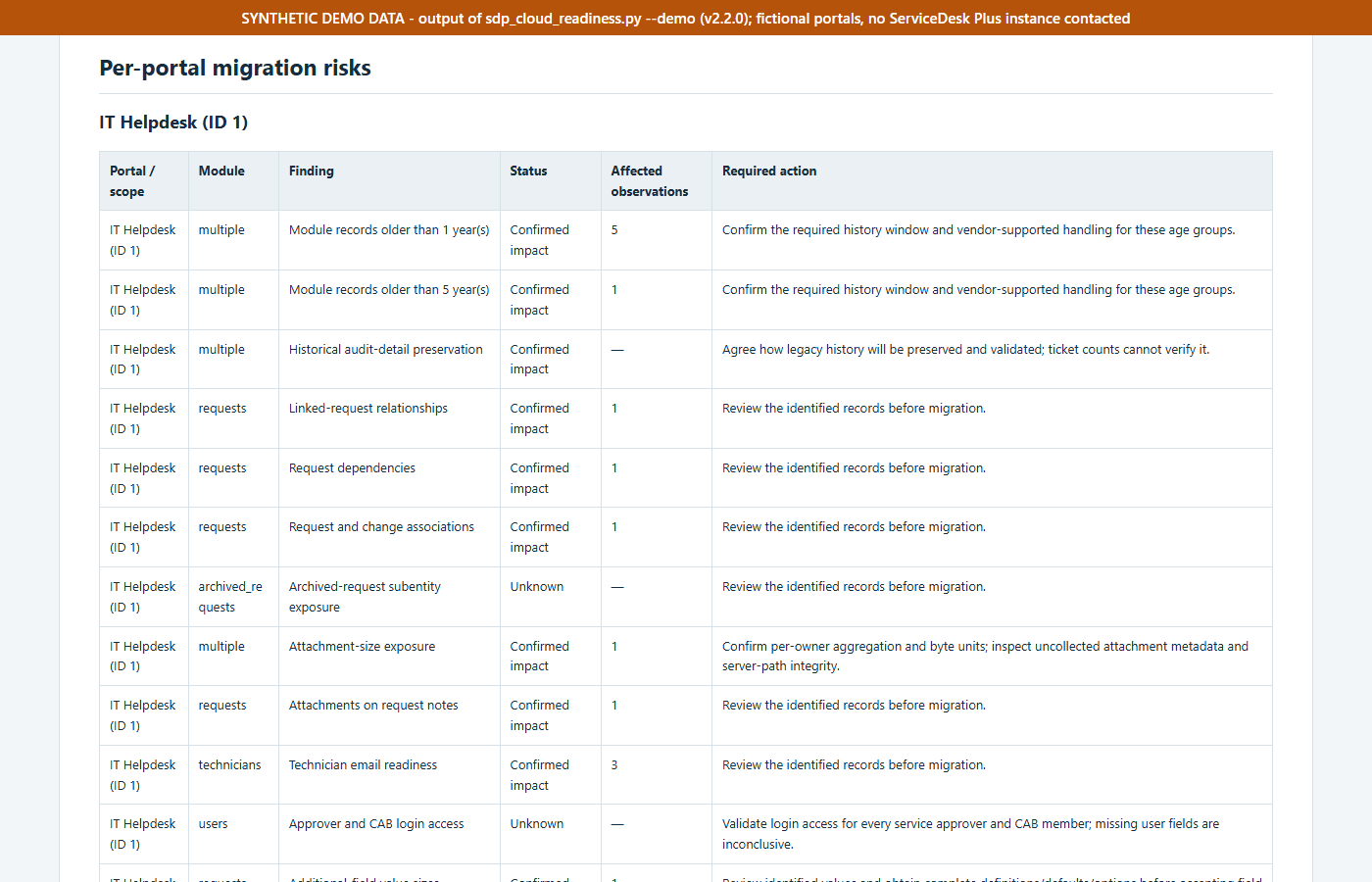
The analyzer in sdp_audit/analyze.py turns the inventory into findings with four possible statuses: CONFIRMED_IMPACT, NO_ISSUE_OBSERVED, UNKNOWN and MANUAL_CONFIRMATION. Among the checks:
- Records older than one and five years, plus a standing finding that historical audit detail needs an agreed preservation method.
- Linked requests, request dependencies and request-to-change associations, which need a migration disposition.
- Attachments on request notes, and per-owner attachment totals.
- Technician email readiness (missing or shared addresses, compared case-insensitively).
- Additional-field value sizes, oversized defaults and options, option characters the migration guide strips, and constraints that vary by form.
- Template task and resource counts above documented limits, and form-script actions.
- SLA, request lifecycle and change workflow references that will have to be rebuilt.
- Query-report inventory, duplicate computer service tags, asset date ordering and VM host references.
The attachment check shows the approach. It adds up known sizes per record owner. It calls a confirmed impact only when a total exceeds both readings of 48 MB, and it treats anything in between as a question for the vendor:
# sdp_audit/analyze.py
                if known_bytes > 50_331_648:
                    hits.append(measurement)
                elif known_bytes > 48_000_000:
                    uncertain_units.append(measurement)
        # Never claim complete attachment inspection: immediate-owner fields
        # do not establish the coverage of every conversation/task/resolution.
        if hits:
            status = CONFIRMED
            summary = f"{len(hits)} observed owner totals exceed both interpretations of 48 MB."
        elif uncertain_units:
            status = MANUAL
            summary = "Observed totals fall between decimal and binary interpretations of 48 MB; confirm the vendor's byte threshold."
Some findings cannot be settled from the source system at all. Final-delta behavior, which identifiers survive, post-go-live export and recovery, and target licensing all depend on the vendor and the target tenant. Those become seven questions at the end of the report (for example “What will the final delta include?” and “Which identifiers will be retained?”). Each lists the related source evidence and what has to be confirmed. The report never says “migration ready.” It produces an exception register for someone to own.
Windows and Python implementation
Most people who would run this work on Windows and cannot install packages on a jump box, so the tool uses only the Python 3.10+ standard library. It ships with two launchers, Run-Assessment.cmd and Run-All-Portals.cmd. The release build produces a portable .pyz, a source ZIP and SHA-256 manifests, and the launchers prefer the adjacent portable app over stale source.
Windows key entry needed its own fix. Pasting with Ctrl+V into a legacy console getpass() prompt can insert a control character instead of the key. The default Windows mode now uses a masked Tk dialog, rejects malformed input locally without sending anything, and --check-key-input tests entry without contacting any host.
Reading the report
Each run writes a new timestamped folder containing report.html, report.md, assessment.json, findings.csv, coverage.csv, vendor-questions.md, a sanitized diagnostics.json and a report-manifest.json, plus a sibling ZIP. After writing, the tool reopens each file and checks its length and SHA-256 before it prints the path. I added that after a run printed a report path that the user then could not find.
When I read a report, I go in this order:
- Topology and access first. How many portals were discovered, how many had successful reads, and whether the directory itself was complete.
- Coverage second. For each portal and module, check that the list is
COMPLETEbefore trusting any count. Detail sampling is reported separately. A complete request list with a 20-record detail sample does not mean every request’s detail was inspected. - Findings third.
CONFIRMED_IMPACTmeans the tool saw affected records.UNKNOWNusually means it could not look.MANUAL_CONFIRMATIONmeans the answer has to come from a person or the vendor. - Questions last. Take
vendor-questions.mdinto the planning conversation with the migration team.
Evidence
The demo run, test run and report screenshots below were captured on 2026-10-21 at commit 777b622.
Synthetic demonstration and tests
The demo runs the real collector, analyzer and report writers against a synthetic in-process server. A test opener replaces the HTTP layer. It only accepts https://synthetic.example.invalid, and it raises an error if anything other than a body-less GET reaches it:
# README.md
python .\sdp_cloud_readiness.py --demo --output-dir .\sdp-assessments
For this article I ran that demo (--demo --no-env, default multi-portal scenario) on Windows 11 with Python 3.14.3. It reported four synthetic portals discovered, three with successful scoped reads, 137 simulated HTTP attempts out of a 500 budget, and 83 coverage rows. The seven vendor questions were generated, and the findings split into 81 confirmed impacts, 27 manual confirmations, 2 no-issue-observed and 115 unknown. These numbers describe a fictional fixture built to exercise permission denials, an unavailable module, an unsupported endpoint and an inaccessible portal. They are not measurements of any real environment.
I also ran the full test suite with python -X utf8 -m unittest discover -s tests. It ran 529 tests: all passed and 6 were skipped. Five of the skipped tests are opt-in graphical key-input tests, and the repository documents one more that is skipped when Windows symlink creation is unavailable. The tests use synthetic fixtures for scenarios like rate limiting, budget exhaustion, interrupted runs, large pagination, mixed permissions and UDF fallbacks, plus a localhost HTTP server for one failure-path test.
Report screenshots
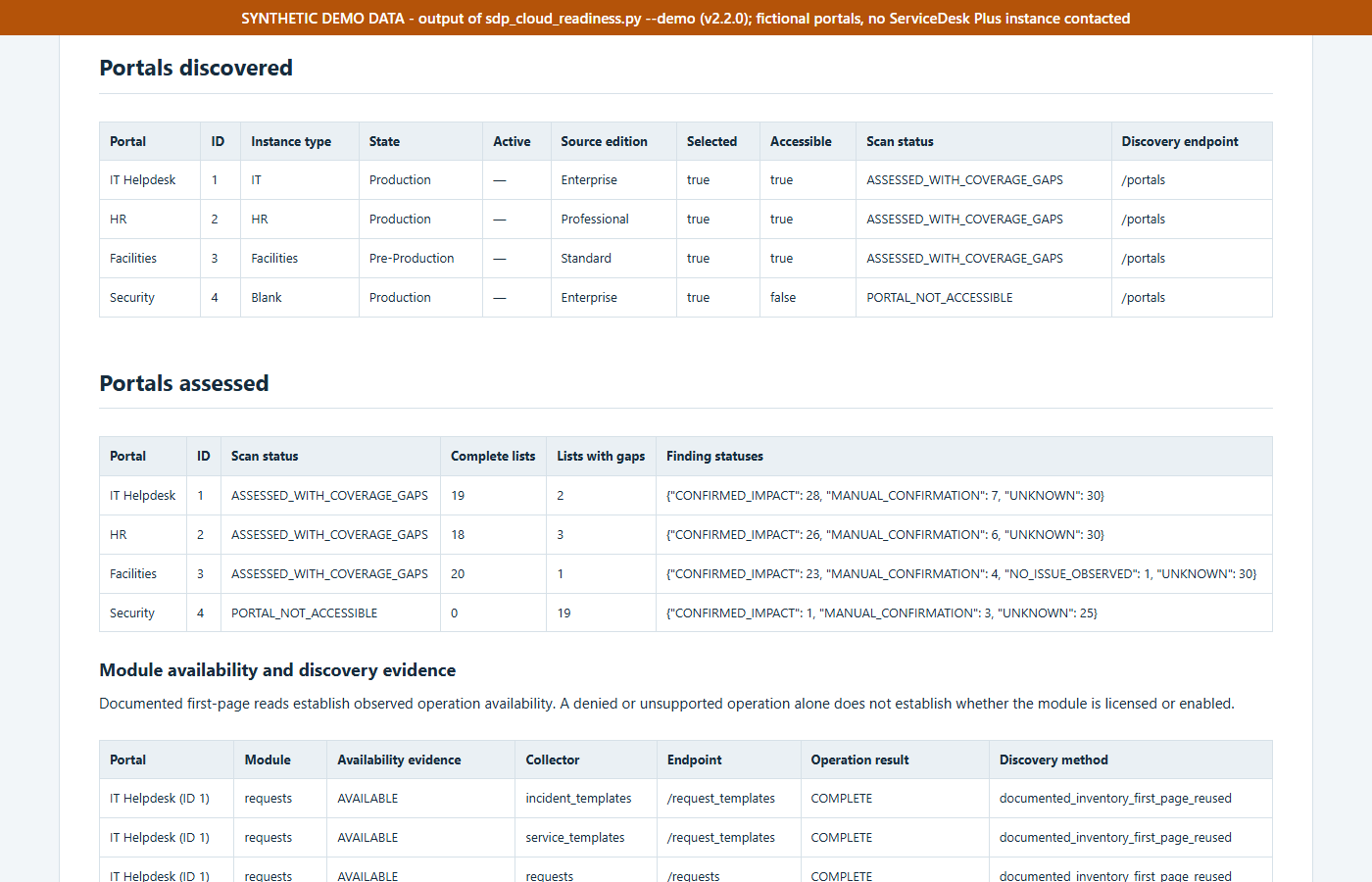
--demo run: four fictional portals, one of which (Security) is deliberately inaccessible.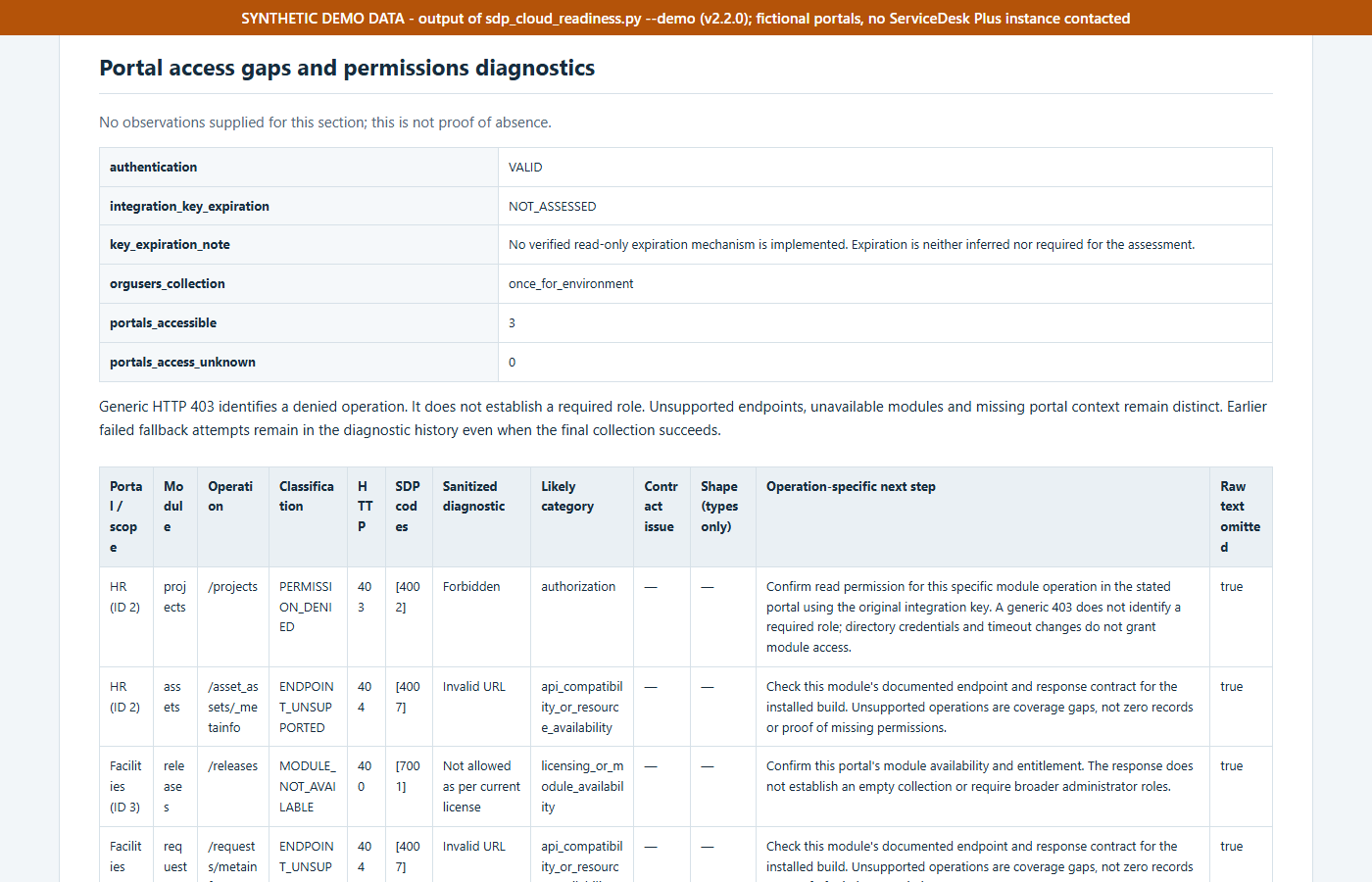
Limitations
The project is at version 2.2.0. It is beta-quality software that is still being actively developed. The public repository’s history begins with an import of the 2.1.2 code in October 2026, and the changelog records the earlier releases. Known limitations:
- Validation is synthetic. The test suite and demos use fixtures and a virtual clock. Passing tests do not show that a documented endpoint works on every ServiceDesk Plus build.
- Portal discovery is not guaranteed. The
/portalscontract comes from third-party integration documentation, and at least one installed build denied the directory read. The changelog lists that case as unresolved. Without discovery, the tool needs IDs you have verified yourself. - Visibility is limited to the key. Complete lists describe only what the assigned credentials can see. Hidden records, archived request completeness and full histories cannot be proven from the API.
- No universal field registry. Several modules have no verified field-definition read, so their field inventory is inferred and incomplete.
- Sampling. Detail and child-record inspection is bounded by default (20 details per collection, 10 request parents for notes and tasks). Large environments will hit the default budgets.
- Behavior can’t be exported through the API. SLA, workflow, script, trigger and integration behavior can be referenced but not exported. All of it still needs a rebuild-and-test plan.
- Target-side unknowns. Edition limits, tenant behavior, final-delta semantics, identifier retention and recovery commitments need written answers from ManageEngine.
- Not a migration approval. The rule set reflects documentation reviewed in early October 2026 and can go out of date as vendor documentation changes.
- Integration-key expiration is not assessed. I did not find a safe documented read for it.
ManageEngine and ServiceDesk Plus are trademarks of Zoho Corporation. CompleteTech LLC is not affiliated with, endorsed by or sponsored by Zoho or ManageEngine. This is an independent tool that reads the documented on-premises API.
Resources
- CompleteTech-ManageEngine/sdp-cloud-readiness. No license file is published, so it is source-available on GitHub. Commit
777b622.
CompleteTech plans and runs ServiceDesk Plus migrations, including pre-migration assessment, mapping SLAs, workflows and templates to the target, and validation after cutover. See ITSM Migration. For ongoing administration of an existing instance, see ITSM Maintenance.