
A single client engagement produces a surprising amount of paperwork: a cover email, an agreement, a deposit invoice, then more email. Each document is easy for an AI agent to draft. The hard part is everything around the drafts: which document comes next, which facts it is allowed to use, who has to approve it, and what happens when an approval is missing. I built four small, reusable agent skills to explore that problem: an orchestrator and three specialists for email, contracts and invoices.
This post walks through how they fit together, what the code actually does, what is only described in instructions, and what happened when I ran them on fictional data. Status: these are experimental, local-only skill packages (versions 1.0.3 to 1.0.10). They generate watermarked drafts. They are not a production billing, legal or email system.
Problem
Why business automation needs orchestration
The obvious way to automate this is one large prompt: “write the contract, the invoice and the email for this client.” That works until it doesn’t. The model fills a missing fee with a plausible number, drafts an invoice before anyone approved the scope, or mentions a signed agreement that does not exist. These are workflow failures more than model failures: the system has no idea what state the engagement is in.
Solution
So I split the work. Specialist skills each own one kind of artifact and refuse to produce the others. A separate orchestrator skill owns the state: which stage the engagement is in, which artifacts exist and at what version, which approvals have been given and by whom, and what the next safe action is. The orchestrator’s README puts it plainly: it “coordinates workflow routing without replacing specialist templates, guardrails, or approval boundaries.”
Reusable skills with narrow boundaries
Each repository is a self-contained skill package: a SKILL.md with agent instructions, reference material, Python scripts and a skill-package.json manifest. They are written for agent runtimes that load skills from a folder (the metadata targets Codex and OpenClaw). All four are MIT licensed, with CompleteTech brand assets reserved.
| Skill | Owns | Entry point | Does not |
|---|---|---|---|
| agentic-services-orchestrator-skill | Workflow definition, project_state, routing, approval triage, event log, validation, recovery |
Instructions plus YAML adapters; scripts only render PDFs and list the skill library | Author specialist artifacts or approve commercial, legal, billing or security decisions |
| agentic-email-skill | Email copy and sequences (52 templates) | scripts/render_email.py |
Send email, call mail APIs, add tracking, approve outreach |
| agentic-contract-skill | Agreement packages from approved terms | generate_contract.py |
Give legal advice, invent terms, issue invoices or send documents |
| agentic-invoice-skill | Billing documents (36 templates) | scripts/render_invoice.py |
Issue invoices, collect payment, post to ledgers, decide tax |
The narrow boundary is the point. The orchestrator’s rules say contract and invoice artifacts “must not invent legal, pricing, tax, payment, client, authority, signature, or approval facts.” Because each specialist does one job, I can reuse the email skill for a kickoff note without dragging contract logic along.
Architecture
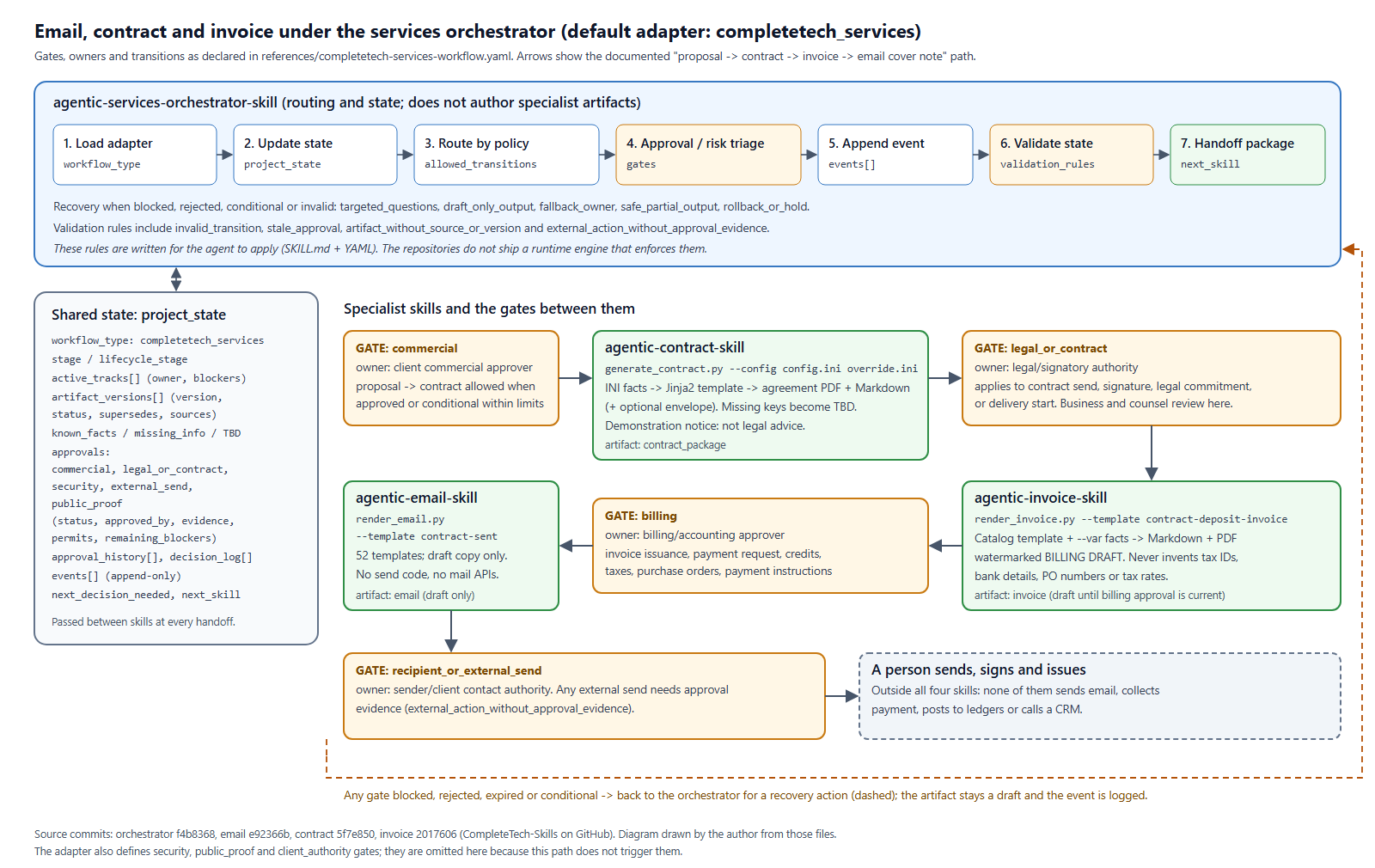
The orchestrator is schema-driven. A workflow definition (an “adapter”) declares stages, allowed transitions, artifact owners, gates, approval states, routing rules, recovery actions and validation rules. The default adapter, references/completetech-services-workflow.yaml, models a services engagement: Discovery, Proposal, Contract, Delivery and Customer Success, with invoice, email, envelope, certificate and case study as supporting outputs. A second adapter for a hiring pipeline shows that the core is not tied to one business process.
Between skills, the orchestrator passes a project_state object. It carries the current stage, active tracks with owners and blockers, versioned artifacts with their sources, known facts, missing information, and one approval record per gate. Every approval record has the same shape: status, approved_by, approved_at, evidence, permits and remaining_blockers. There are ten approval states, including partial, conditional, expired and superseded, because real approvals are rarely a clean yes or no.
Implementation
Structured workflow state
The repository ships a worked example of this state for a fictional pilot with Northwind Trading Co. Here is how it records an email that has been drafted but not cleared to send:
# agentic-services-orchestrator-skill/references/full-workflow-variables.yaml
    external_send:
      status: requested
      approved_by: TBD
      approved_at: TBD
      evidence: email draft PRO-OUT-014
      permits: []
      remaining_blockers:
      - recipient approval pending
The empty permits list is the useful part: the draft exists, someone has been asked, and nothing is permitted yet.
Email generation
The email skill is a template catalog plus a small renderer. references/email-catalog.md holds 52 templates organized by decision point: cold outbound, follow-up, discovery, proposal, closing, contract and payment, kickoff, delivery, expansion and nurture. references/template-index.json gives each one an ID, stage, subject and call to action, and scripts/render_email.py fills placeholders and can export a branded PDF.
The renderer has one detail I like. Placeholders you do not supply are left in the output instead of disappearing or raising an error:
# agentic-email-skill/scripts/render_email.py
class SafeDict(dict[str, str]):
    def __missing__(self, key: str) -> str:
        return "{" + key + "}"
A draft that still says {contract_link} is obviously unfinished; a draft with a guessed link is not. The instructions add softer rules: one call to action per email, cold emails under 120 words, and no invented proof, metrics or legal claims. There is no sending code in the repository. The PDF export defaults to a “DEMO DRAFT” watermark.
Contract preparation
The contract skill is the most substantial piece of code: generate_contract.py is about 1,000 lines. It reads one or more INI files (a base config.ini plus client overrides), renders a Jinja2 agreement template with StrictUndefined, and builds a branded PDF with ReportLab, plus the filled Markdown and an optional addressed envelope.
The template covers the parts that matter for agentic work specifically: autonomy level, human-in-the-loop requirements, model or stack, deployment environment, evaluation plan, monitoring plan and excluded uses. Those values come from an [agentic_development] section in the config, so the agreement describes the same approval boundaries the workflow enforces.
When a fact is missing, the generator writes TBD instead of guessing:
# agentic-contract-skill/generate_contract.py (build_context)
    for section, keys in fallback_keys.items():
        for key in keys:
            context[section].setdefault(key, "TBD")
The template opens with a demonstration notice saying it “is not legal advice and should be replaced or reviewed before real use,” and the default footer repeats that. I want to be equally clear here: a generated agreement is a draft, not legal advice. It needs review by the business and, where appropriate, by counsel before anyone signs it. The skill does not change that. What it does is give the reviewer a consistent document built from stated facts, with the gaps marked.
Invoice preparation
The invoice skill follows the same pattern as email: a 36-template catalog covering deposits, milestones, retainers, change orders, pass-through costs, credits, refunds, receipts and void notices, plus a renderer that exports a PDF watermarked “BILLING DRAFT.” The guidance is about choosing the right document for the actual billing trigger. For example, if the contract bills on milestone acceptance, use the milestone invoice, not the prototype-delivery invoice.
The fabrication guardrail is stated directly in SKILL.md: “Never fabricate bank accounts, tax IDs, purchase order numbers, tax rates, or compliance status.” The lifecycle reference adds a checklist to run before issuing anything: a signed agreement or written approval, a unique invoice number, tax rates supplied by the user or accounting system, and credits deducted correctly. Tax, ledger and collection decisions stay with a person or an accounting system.
Human approval checkpoints
The default adapter defines seven gates, each with a named owner role. Four of them sit on the email, contract and invoice path:
# agentic-services-orchestrator-skill/references/completetech-services-workflow.yaml
  - gate_id: billing
    owner: billing/accounting approver
    category: non_security
    applies_when: invoice issuance, payment request, credits, receipts, taxes, purchase orders, or payment instructions are involved
  - gate_id: recipient_or_external_send
    owner: sender/client contact authority
    category: non_security
    applies_when: email, envelope, attachment package, or external send is requested
The other two on this path are commercial (the client’s commercial approver, needed before the proposal-to-contract transition) and legal_or_contract (legal or signatory authority, needed before a contract is sent or signed). The remaining three cover security, public proof and unclear client authority.
Security review is deliberately not the default gate. Commercial, legal, billing and send approvals go to the people who own those decisions; security review is reserved for credentials, sensitive data, new tool permissions or production impact. The security reviewer is not the person who knows whether the fee is right.
When a gate is blocked, rejected, expired or conditional, the orchestrator is told to pick the smallest safe recovery action: targeted questions, a clearly marked draft-only output, a fallback owner, a partial output limited to what was approved, or a hold. Downstream work before upstream approval is allowed, but only as a draft with the blocker recorded.
Validation and auditability
It is important to be precise about what is code and what is instruction here. The adapter declares nine validation rules, including invalid_transition, stale_approval, artifact_without_source_or_version and external_action_without_approval_evidence. The orchestrator’s instructions tell the agent to check them before any final output or external action and to append an event for every material state change. But the repositories do not include a runtime engine that enforces those rules. They are a contract for the agent, written in YAML and Markdown, and the agent applies them.
Update, October 22, 2026: PR #4 (orchestrator 1.1.0) adds scripts/validate_state.py, a deterministic checker the agent is told to run before gated steps. It rejects transitions the workflow does not allow, and refuses gated actions such as external_send, issue_invoice and production_launch unless the matching gate is approved with an approver and a date. It is still a check the agent runs, not a runtime guard that can stop an agent that skips it.
The code that does run is a set of package and quality validators. Each repository ships scripts/validate_package.py (a standard-library check of the manifest, required files, safe paths, documentation links and the logo PNG’s chunk checksums) and scripts/validate_quality.py (Python compile, ruff, YAML/JSON/INI parsing, Mermaid rendering, generator smoke tests, pyright where configured, and a check that the publishable bundle contains only text files). GitHub Actions runs the package contract tests on Ubuntu, Windows and macOS.
For auditability, the strongest piece is the structure: approvals carry evidence and permitted scope, events have an actor and timestamp, artifacts carry version and source links, and generated PDFs are watermarked as drafts. That gives a reviewer something concrete to check. It does not prove that an agent followed the rules.
Evidence
Everything in this section was captured on 2026-10-21 at commits f4b8368 (orchestrator), e92366b (email), 5f7e850 (contract) and 2017606 (invoice).
End-to-end demonstration on fictional data
I ran the three specialists in the documented order (contract, then invoice, then the email cover note) on my Windows machine with Python 3.14, using the repositories’ pinned dependencies. All parties are fictional. Northwind Trading Co. and its contacts come from the demo override the contract repository ships; the invoice number and dates are values I made up. Nothing was sent anywhere, and none of the scripts has any way to send.
- Contract.
python generate_contract.py --config config.ini examples/northwind_support_triage.ini --out demo/contract.pdf --markdown-out demo/contract.md --no-envelopeproduced a PDF and a 1,970-word Markdown agreement (contract ID ADSA-2026-0142, fixed fee USD 28,000, deposit USD 8,400 at signing) with the demonstration notice at the top. Because the override filled every field, it contained no TBD values. Running the base config with a sparse override instead produced nine TBD markers where address and formation facts were missing. - Invoice.
render_invoice.py --template contract-deposit-invoicewith the contract ID, a USD 8,400 line item and fictional dates produced a one-page PDF watermarked “BILLING DRAFT” with the footer “billing draft only – verify before use.” - Email.
render_email.py --template contract-sentproduced a three-sentence cover note referencing the agreement, exported as a PDF with the default “DEMO DRAFT” watermark.
The test and validation runs, at the commits listed below:
- Package contract unit tests: orchestrator 27 tests, invoice 16, email 10, contract 10. All passed; six symbolic-link tests were skipped because Windows would not let my account create symlinks.
validate_package.py: “Package contract OK” in all four repositories.validate_quality.py --skip-mermaid: passed for the orchestrator, email and invoice skills. For the contract skill, the compile, ruff, parsing and generator smoke steps passed, then it stopped because pyright was not installed on my machine. I did not render the Mermaid diagrams.
Two rough edges showed up in the generated drafts. The invoice renderer copies the catalog’s “Use when:” selection hint into the document body, and consecutive lines like “Invoice Number” and “Issue Date” are merged into one paragraph in the PDF. Both are cosmetic, both would be caught by the human review the workflow requires, and both are worth fixing.
Checking the declarative rules
To see how far the declarative rules get you, I wrote a 30-line script (mine, not part of the repositories) that applies a few of them to the repository’s own worked Northwind state. It found three things worth knowing:
- The example records a
delivery -> security_reviewtransition.security_reviewis a track stage, not a lifecycle stage, so a strict reading ofallowed_transitionswould reject it. - The
project_stateapproval slots arecommercial,legal_or_contract,security,external_sendandpublic_proof. The adapter’s gates includebilling,client_authorityandrecipient_or_external_send, which have no matching slot. In other words, the billing gate is declared but the state schema has nowhere to record its approval. - The example’s
public_proofapproval isapprovedwhileapproved_atis still TBD.
All three are fixed in PR #4: every gate now names its approval record (with billing and client_authority added), security review is recorded as a parallel track rather than a stage, and the example approvals carry dates.
None of these break anything today, because a person or an agent interprets the state, but they are exactly the drift a real validator would catch.
What carries over
Make the approval record a data structure with evidence and permitted scope, not a sentence in a chat log. Keep specialists narrow enough to refuse work that belongs to another skill. And make missing facts visible (TBD, unfilled placeholders, draft watermarks): a reviewer can only catch what the draft admits it does not know.
If you are working on something similar, this is the kind of work I do under Idea to Solution, and connecting skills like these to real CRMs, mailboxes or accounting systems behind approval gates falls under API Development and Integrations.
Limitations
- Experimental. The packages are versioned 1.0.3 (orchestrator), 1.0.9 (email, contract) and 1.0.10 (invoice), with history starting in May 2026. Nothing in the repositories documents a real engagement run end to end with them, and nothing in this post is real-world validation.
- Governance is instruction-based. Routing, gates and event logging are rules the agent is told to follow. Since PR #4 a state validator checks transitions and gate approvals, but the agent has to run it; there is no workflow engine that enforces it, so compliance still depends on the agent and the reviewer. Follow-up issues track pointing the email, contract and invoice skills at the validator.
- Schema drift (fixed on main). At the reviewed commit, the
billing,client_authorityandrecipient_or_external_sendgates had no approval slot inproject_state, and the worked example used a transition the adapter does not list. PR #4 resolves both. - TBD fallback only covers missing keys. In
generate_contract.py, a key that is present but left blank stays blank instead of becoming TBD. - Template drafts, not finished documents. The contract template is generic and marked as a demonstration. The email and invoice renderers fill templates; polished, context-aware copy still needs an agent or a person to rewrite it. The invoice output has the formatting issues described above.
- No integrations by design. Nothing sends email, issues invoices, collects payment or touches a CRM. Connecting those systems would need its own approval and credential design.
- Partial test coverage. The test suites check package structure and the skill-library tooling, not the content of generated contracts, invoices or emails.
Resources
- agentic-services-orchestrator-skill – MIT License – commit
f4b8368 - agentic-email-skill – MIT License – commit
e92366b - agentic-contract-skill – MIT License – commit
5f7e850 - agentic-invoice-skill – MIT License – commit
2017606
CompleteTech LLC names, logos and brand assets in these repositories are reserved and not covered by the MIT License.