
I wanted a small speech-to-text tool I could host myself: press a button and watch a live transcript appear from the microphone, or drop in a recording and get text back, then clean the text up and download it as subtitles. The part I cared about most was not the transcription itself, which a hosted model does, but keeping the provider API key off the browser and being clear about where the audio actually goes. The result is Signal STT, a Next.js and React app that does live microphone transcription over WebRTC and file transcription through a server route, both against the OpenAI API.
Status: early prototype (version 0.1.0, not published as a package). The repository is source-available on GitHub with no license file. For this article I ran it locally without an API key, so no audio was ever sent to the provider, and the transcript you see in the screenshots is a synthetic fixture.
Problem
WebRTC needs an offer/answer exchange before media flows. The browser creates an RTCPeerConnection, adds the microphone track, opens a data channel called oai-events for transcript events, and generates an SDP offer. The question is who sends that offer to the provider, because whoever does needs a credential.
A common way to connect a browser to a realtime API over WebRTC is to mint a short-lived client secret on the server and let the browser use that to connect. The first version of this app did exactly that: the UI fetched a client secret from /api/realtime/session and then called the provider’s /v1/realtime/calls endpoint from the browser with it. A later commit (dad8f23, “proxy realtime webrtc setup server-side”) moved the SDP exchange to the server, so the browser holds neither the API key nor a client secret.
Solution
There is one page with two modes and a shared transcript workspace:
- Live Mic asks for microphone permission, opens a WebRTC connection to the provider’s Realtime API, and streams partial and final transcript text into the workspace as you speak.
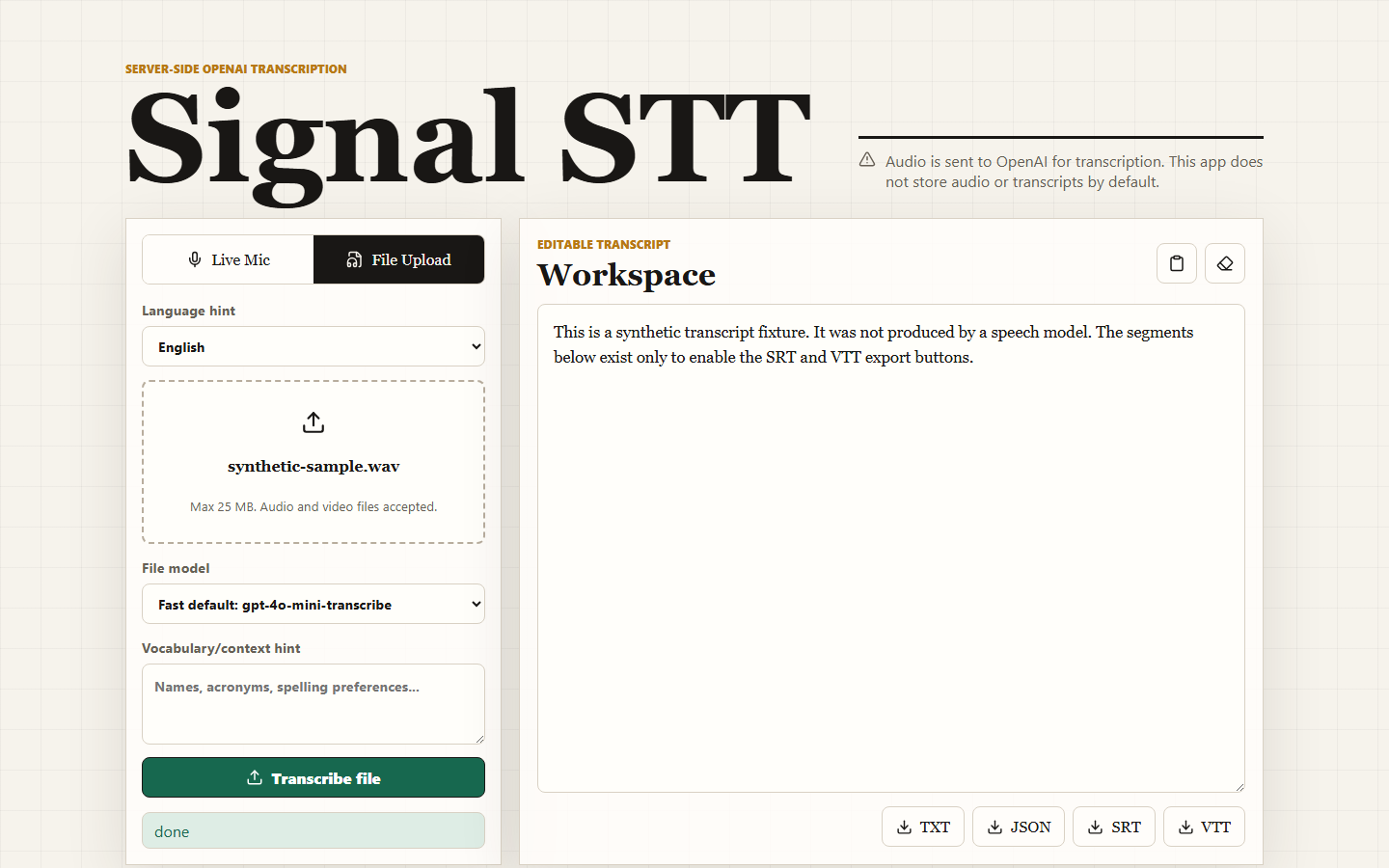
- File Upload takes a common audio or video file (up to 25 MB by default), sends it to a server route, and shows the returned text. You can pick between a fast default model and a higher-accuracy one, and add a short vocabulary hint for names and acronyms.
- Transcript workspace is an editable text area with copy and clear buttons, plus TXT, JSON, SRT and VTT downloads.
The configured defaults live in src/lib/constants.ts: gpt-realtime-whisper for live transcription, gpt-4o-mini-transcribe for files, and gpt-4o-transcribe as the accuracy option. Each can be overridden with an environment variable. I did not call any of these models for this article, so I cannot say anything about their accuracy or latency here.
Architecture
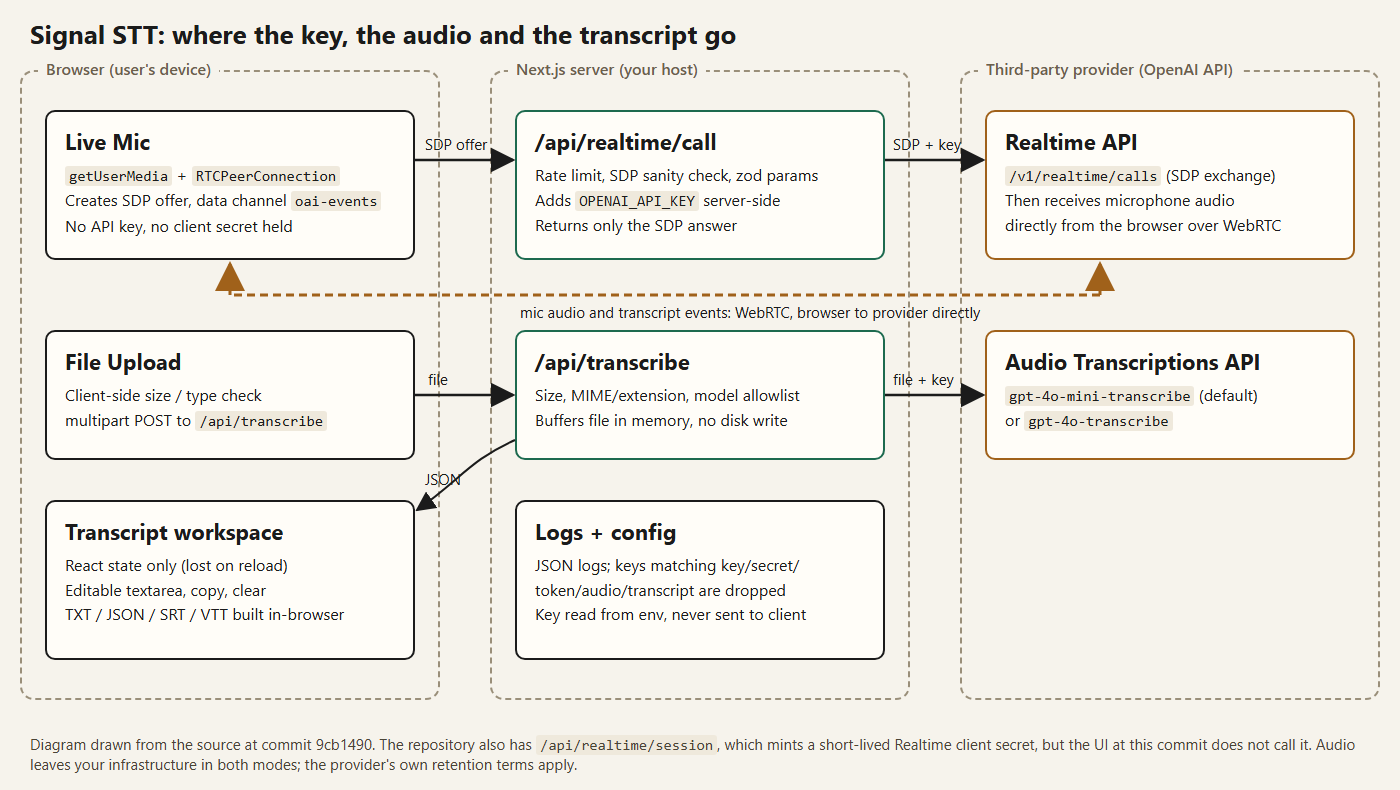
The stack is Next.js (App Router), React and TypeScript; the lockfile at the reviewed commit resolves to Next.js 16.2.9, React 19.2.7 and the openai SDK 6.42.0, with zod for validation. The main files:
components/stt-app.tsxis the whole client UI.app/api/realtime/call/route.tsaccepts a WebRTC SDP offer from the browser and returns the provider’s SDP answer.app/api/transcribe/route.tsaccepts a multipart upload and returns a transcript document.app/api/realtime/session/route.tscreated a short-lived Realtime client secret at the reviewed commit; it has since been removed (more below).src/server/*holds the provider calls and rate limiter;src/lib/*holds config, validation, errors, logging and exports.
The provider wrappers and config loader start with import 'server-only', which makes the Next.js build fail if client code ever imports them. That is a cheap guard against accidentally bundling the module that reads OPENAI_API_KEY into the browser.
Implementation
Live microphone transcription over WebRTC
In this app the browser posts the raw SDP to its own server, and the server makes the authenticated call:
# src/server/realtime.ts (excerpt)
const response = await fetch('https://api.openai.com/v1/realtime/calls', {
  method: 'POST',
  headers: {
    Authorization: `Bearer ${apiKey}`,
    ...(input.safetyIdentifier ? { 'OpenAI-Safety-Identifier': input.safetyIdentifier } : {})
  },
  body: form,
  signal: controller.signal
});

const body = await response.text();
// ...error mapping...
if (!body.trim().startsWith('v=')) {
  throw new AppError('UPSTREAM_ERROR', 'Realtime response did not include a valid SDP answer.', 502);
}
The form carries the SDP plus a transcription-only session config (model, language hint, delay setting). The route in front of it applies a per-client rate limit, rejects bodies that do not start like an SDP document (v=), validates the language and delay parameters with zod, and aborts the upstream call after 30 seconds by default. The browser gets back only the SDP answer as application/sdp.
One thing worth being precise about: only the signaling goes through my server. Once the answer is applied, the browser’s audio travels over WebRTC to the provider directly, and transcript events come back on the data channel. The server never sees the audio in live mode, and the provider always does.
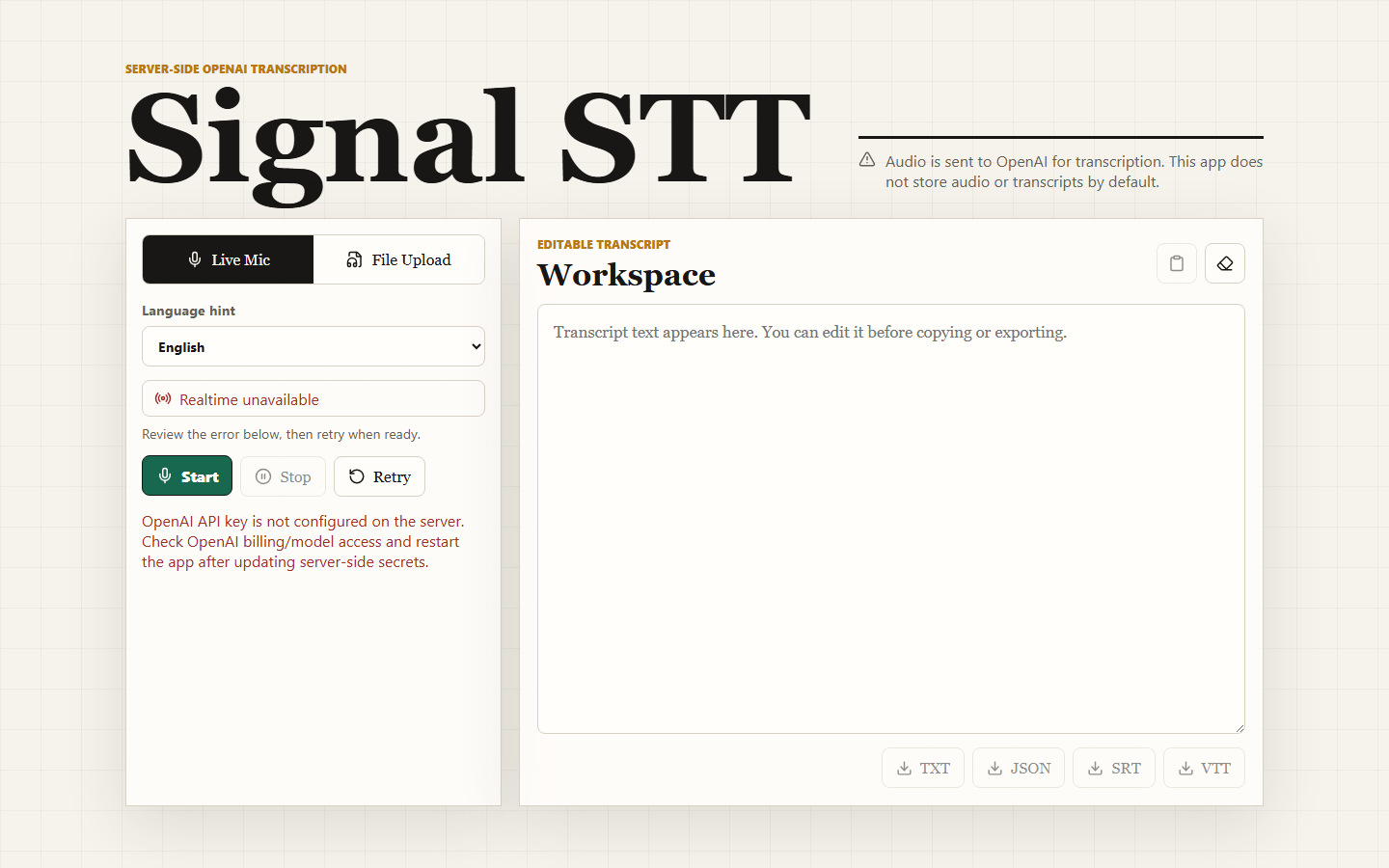
If realtime setup fails, the client checks why. Failures the server reports as configuration problems (MISSING_API_KEY, UPSTREAM_ERROR, CONFIGURATION_ERROR, RATE_LIMITED) are shown as errors. Other failures, such as a browser or network-level WebRTC problem, switch to a fallback that records locally with MediaRecorder and uploads the recording through the file route after you press Stop. The repository has a Playwright test asserting that a mocked upstream HTTP 500 does not trigger that fallback, so a billing problem is not hidden behind a recording that will fail the same way later.
Server-side key protection and ephemeral session credentials
The session route was still in the repository at the reviewed commit. It requested a transcription session secret and returned the secret value, its expiry and the model name, but at the commit I reviewed nothing in the UI called it, and PR #7 has since removed it. Both approaches keep the long-lived key off the client. The trade-off is that the client-secret approach puts a short-lived credential in the browser, while the proxy approach puts the server in the signaling path but never hands anything usable to the browser. If you deploy this, I would either remove the unused route or put it behind authentication, since anyone who can reach it can mint session secrets on your account until the rate limit kicks in.
The rest of the key handling is straightforward:
- The key is read from
OPENAI_API_KEYinsrc/lib/config.ts; there is noNEXT_PUBLIC_variable, which is how Next.js would expose a value to the browser. npm startrunsscripts/validate-env.mjsfirst, which checks that a key is present and key-shaped without printing it..dockerignoreexcludes.env*files (except the example) from the image build context, and the README says to pass the secret at runtime.- Upstream errors are mapped into a small set of codes. A 401 from the provider becomes “OpenAI rejected the server API key” with a 503, so the client learns the server is misconfigured without seeing provider internals.
Logging is structured JSON and uses a name-based filter:
# src/lib/logging.ts (excerpt)
const redact = (meta: LogMeta = {}) =>
  Object.fromEntries(
    Object.entries(meta).filter(([key]) => !/key|secret|token|audio|transcript/i.test(key))
  );
This drops fields by name, not by content: a secret in a field called message would still be logged. The real protection is that the routes only log sizes, MIME types, model names, language, error codes and expiry times; the filter is a backstop.
File-upload transcription
The upload route checks things in this order: rate limit, the Content-Length header against the upload limit, presence of a file, file size and type, then the form fields. A file is accepted if either its MIME type or its extension is on the allowlist in constants.ts, which covers common audio formats plus MP4, MPEG, QuickTime and WebM video. The model field must be one of the two configured file models, and the vocabulary hint is capped at 500 characters.
The file is read into a buffer and passed to the SDK’s audio transcription call with response_format: 'json'. Nothing is written to disk, and the route does not keep the audio or the transcript after responding.
Editing and exporting transcripts
The workspace is a controlled text area bound to React state. While live transcription is running, partial text is shown after the committed text and is folded in as final events arrive; typing in the box commits whatever is there. Copy uses the clipboard API, and every download is built in the browser with a Blob and an object URL, so exporting never makes another server request.
TXT and JSON are simple. The JSON export includes the text, language, model, creation time and any segments. SRT and VTT need start and end times, so those buttons are only enabled when the transcript has at least one segment with finite timestamps. The formatting is small enough to read in full:
# src/lib/transcriptExport.ts (excerpt)
const formatTimestamp = (seconds: number, separator: ',' | '.') => {
  const bounded = Math.max(0, seconds);
  const hours = Math.floor(bounded / 3600);
  const minutes = Math.floor((bounded % 3600) / 60);
  const wholeSeconds = Math.floor(bounded % 60);
  const milliseconds = Math.floor((bounded - Math.floor(bounded)) * 1000);
  return `${pad(hours)}:${pad(minutes)}:${pad(wholeSeconds)}${separator}${pad(milliseconds, 3)}`;
};

export const exportSrt = (segments: TranscriptSegment[] = []) =>
  segments
    .map(
      (segment, index) =>
        `${index + 1}\n${formatTimestamp(segment.start, ',')} --> ${formatTimestamp(
          segment.end,
          ','
        )}\n${segment.text.trim()}\n`
    )
    .join('\n');
The only difference between the two subtitle formats is the decimal separator (comma for SRT, period for VTT), the WEBVTT header, and SRT’s numbered cues. Negative times are clamped to zero. At the reviewed commit, milliseconds were truncated rather than rounded, so a float like 1.001 seconds came out as 00:00:01,000; I checked that in Node. PR #7 now rounds to whole milliseconds.
Two limits matter here. First, editing the text does not change the segments, so SRT and VTT always export the original segment text even after you correct a word in the box; only TXT and JSON reflect edits. Second, segments only exist if the provider response includes them. The upload path requests the plain json format and passes through whatever segments come back, and live mode never creates segments at all. I could not verify without a key whether the default file models return segments in that format, so in practice SRT and VTT may stay disabled until the request format or model is changed.
Security and privacy: what the code does and does not cover
The app is designed to keep the provider key on the server and to avoid storing audio or transcripts itself. Following the data:
- Audio goes to a third party in both modes. In live mode the browser sends it to the provider over WebRTC; in upload mode my server forwards the file. The UI says this at the top of the page. What the provider retains, and for how long, is governed by its own terms and your account settings, not by this code.
- The app does not persist audio or transcripts. Uploads are buffered in memory for the request. Transcripts live in React state in the tab and are gone on reload. There is no database.
- Logs carry metadata, not content. As described above, with a name-based filter as a backstop. A
LOG_TRANSCRIPTSflag exists, but at this commit it only adds a transcript length to the returned document, and it is forced off whenNODE_ENVis production. - A client identifier is sent to the provider. At the reviewed commit, the realtime routes sent an
OpenAI-Safety-Identifierheader set to the caller’s forwarded IP address. Since PR #7 (October 22, 2026) the header carries a salted SHA-256 hash of the client address instead, and is omitted when clients cannot be told apart. It is still a stable pseudonymous identifier and belongs in any privacy notice. - Response headers.
next.config.mjsdisables theX-Powered-Byheader and setsX-Content-Type-Options: nosniff, a strict-origin referrer policy, and aPermissions-Policythat allows the microphone only for the app’s own origin and blocks camera, geolocation, payment and USB. I confirmed these on the running dev server. There is no Content-Security-Policy.
What is not covered:
- There is no user authentication. Any client that can reach the app can use your provider account up to the rate limit. For anything beyond a private network or a single trusted user, put it behind authentication.
- The rate limiter is in-memory. Counters are per process, are not shared across instances, and reset on restart. At the reviewed commit the client key came from a client-settable
X-Forwarded-For; since PR #7 forwarding headers are trusted only whenTRUST_PROXY=true, and otherwise all callers share one bucket that cannot be bypassed by rotating headers. - Request size depends on the header. The route checks
Content-Lengthbefore parsing the form, then checks the parsed file size. A request without that header is parsed into memory before the file-size check runs. I did not test how the hosting layer limits that. - The file type check is permissive. Either a matching MIME type or a matching extension is enough, and neither is verified against the file’s contents. The provider is the real parser.
Evidence
Everything in this section was captured on 2026-10-21 at commit 9cb1490.
What I ran
I cloned the repository at commit 9cb1490, installed dependencies with npm ci --ignore-scripts, and ran the unit and integration suite with Vitest: 6 test files, 15 tests, all passing. The provider client is mocked in those tests, so they check the app’s own logic, not transcription quality. TypeScript (tsc --noEmit) and ESLint with zero warnings allowed both passed.
I then ran the dev server with no API key and telemetry disabled, exercised the API routes with curl, and drove the UI with a Playwright script that blocked every non-localhost request and mocked /api/transcribe with the synthetic fixture. I did not run the repository’s own Playwright end-to-end suite, although my script covers similar ground. I did not run the Docker build, verify:openai or smoke:upload, because those need a key or call the provider.
Local runs without a key
When I posted a Markdown file to the running dev server with no key configured, it came back as INVALID_FILE (unsupported file type) before any provider call was attempted. The health endpoint reported openaiConfigured: false and the default model names.
Limitations
- Early prototype. Version 0.1.0, one author, no releases and no CI configuration in the repository.
- Not tested against the provider for this article. I did not verify live transcription, file transcription, latency, accuracy or the configured model names end to end.
- No authentication. Options are tracked in issue #5. The rate limiter is single-process, as described above.
- Unused credential route (removed).
/api/realtime/sessionminted client secrets even though the UI did not call it. PR #7 removed it. - Timed exports are limited. SRT and VTT need provider segments, ignore edits made in the workspace, and are never available for live transcripts (issue #6).
- Transcripts are not saved anywhere, by design. Reloading the page loses unsaved work.
- No license. The code is source-available, not open source; reuse terms are not granted by the repository.
Resources
- CompleteTech-LLC/stt-app – no license file (source-available) – commit
9cb1490
If you need a hosted AI service wired into an application without exposing credentials to the browser, or want a working prototype to test an idea like this one, CompleteTech works on API development and integrations and prototyping and MVP development.