Clean Drop is a field-reporting workflow for water points: a community member photographs a broken pump, a queue of orange jugs or a basin of cloudy water, adds a time and place, and Gemma 4 drafts a structured triage report that a person reviews before it is submitted. Team Clean Drop built it for the Gemma 4 Good hackathon on Kaggle, aimed at water resources in Somalia. I was one of five people on the team, and the credits are at the end of this post.
The idea behind it is simple. Water point outages, contamination and supply shortages are often reported late or not at all, because connectivity is poor and the reporting path is slow or not trusted. A photo plus a short draft that a local model writes on the spot is easier to send than a form, and easier for a coordinator to sort.
Status: this is a hackathon prototype. The public repository holds the write-up, app screenshots and one Kaggle notebook; the mobile app and its Field Report API are not in it. The entry also missed the hackathon’s submission window: we reached the form at the deadline on May 18, 2026, and it did not accept the entry.
What the team set out to build
The README states the goal as reliable access to safe water through monitoring, rapid response and community feedback. It names five focus areas: water point outages, water quality, access barriers, supply shortages and infrastructure damage.
Two design choices shaped everything else:
- Image first. Visual evidence comes before text, so people with limited literacy or a weak connection can still contribute. The README picks orange jugs as the main field indicator, because a long line of them at a water point is easy to see and photograph.
- Local model, reviewed output. Gemma 4 runs on edge hardware rather than a distant cloud service, and its output is a draft. A person confirms or corrects it before anything is submitted.
The four report categories are water quality, sanitation, infrastructure and health risk. Severity has four levels: low, medium, high and critical.
The field report flow in the demo app
The demo app is a single dark-themed screen with four numbered steps, and the team’s demo video walks through it in about 90 seconds: Team Clean Drop – Gemma 4 Good Hackathon – Somalia Water Resources, posted by frymatic on the Brazen Studios channel.
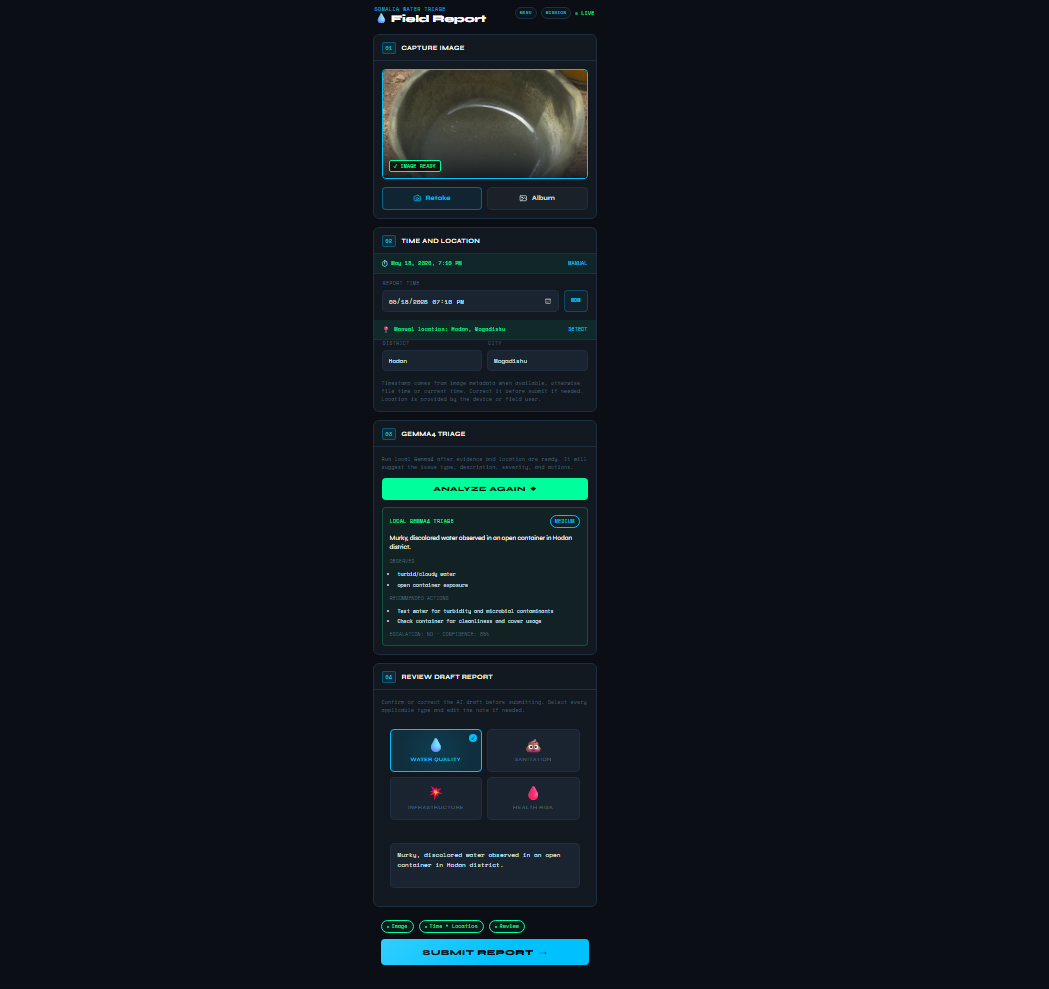
- Capture image. Take a photo or choose one from the album. The README describes Droppy, the project’s helper character, checking whether the image is good enough to analyze.
- Time and location. The report time comes from image metadata when available, otherwise file time or the current time. Location comes from the device or is entered by hand; in the screenshot it is set manually to Hodan, Mogadishu.
- Gemma 4 triage. Once evidence and location are ready, the user runs the local model. It returns a summary, a severity, observed issues, recommended actions, an escalation flag and a confidence value.
- Review draft report. The user confirms or changes the category tiles and edits the note, then submits.
One detail from the README I would reuse in any app like this is stale-result prevention. The interface throws away the previous analysis when the image changes, waits for the new image data before enabling analysis, ignores model responses that arrive for an older image, and clears the old draft when a new capture starts. Without that, a slow model response could attach the analysis of one photo to a different report.
How Gemma 4 fits in
According to the README, the demo configuration runs the ggml-org/gemma-4-26b-a4b-it-GGUF:Q4_K_M multimodal model in a private llama.cpp runtime using the Vulkan backend. The phone app does not call the model directly. It calls a narrow, same-origin Field Report API that validates requests, resizes images, sends a constrained prompt, repairs malformed JSON when it can, and normalizes the result to a fixed schema before returning it.
The schema is what makes the output usable by both the reviewer and a dashboard. The fields named in the README are summary, severity, category (plus a categories list), observedIssues, recommendedActions, needsEscalation and confidence.
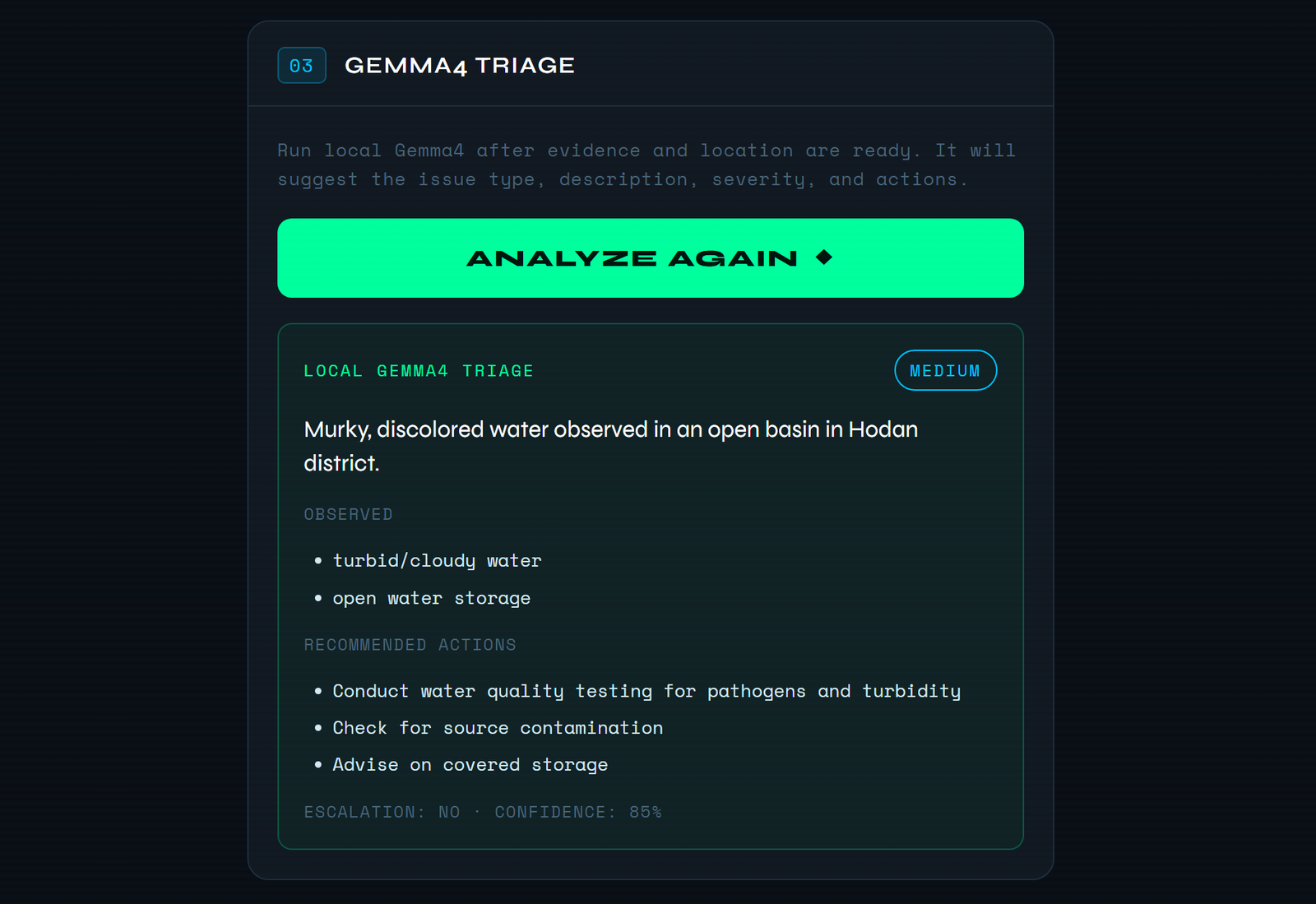
The README also says the API boundary is meant to stop the model from giving medical diagnoses, inventing engineering certainty or making epidemiological claims, and that unclear images should get lower confidence. I could not check how that was enforced, because the API code is not in the repository. The model’s output in the screenshot stays within those limits: it describes what is visible and suggests testing rather than naming a cause.
The Kaggle notebook: what actually runs
The runnable part of the repository is submission-notebook/gemma4good_field_report_kaggle.ipynb, 19 cells with no saved outputs. It recreates the field report flow without the app, the API, a camera or GPS: pick an image, set metadata, triage, review, then “submit” by writing JSON, JSONL and CSV files to the notebook’s output folder.
The important thing to know about this notebook is that it does not run Gemma 4. By default it downloads the roughly 16 GB GGUF model file from Hugging Face (with resume support and an optional partial “connectivity test” download), but it never starts a llama.cpp runtime. The triage that runs is a deterministic keyword engine, and the notebook says so in its own fallback reason:
# submission-notebook/gemma4good_field_report_kaggle.ipynb, cell 12
draft = triage_with_fallback(image, metadata, reason=MODEL_BUNDLE.error if not MODEL_BUNDLE.complete else 'GGUF downloaded; deterministic triage used because notebook does not launch llama.cpp runtime')
There is a local_model triage mode in the display code, but nothing in the notebook ever produces it. Every report it writes is labelled deterministic_fallback.
The fallback scores each category by matching keywords in the field note, then picks a severity the same way:
# submission-notebook/gemma4good_field_report_kaggle.ipynb, cell 10
SEVERITY_KEYWORDS = {
    'critical': ['cholera', 'outbreak', 'severe', 'urgent', 'hospital', 'critical', 'no water'],
    'high': ['leak', 'sewage', 'stagnant', 'standing water', 'broken', 'contaminated', 'smell', 'illness'],
    'medium': ['dirty', 'trash', 'cloudy', 'repair', 'waste', 'discoloration'],
    'low': ['minor', 'monitor', 'routine'],
}
The image contributes only a little. The engine shrinks it to 96 x 96 pixels and uses average color, brightness and contrast as small nudges: a brownish or greenish tint adds to water quality, high contrast adds to sanitation and infrastructure. It also adds a small amount based on a hash of the image bytes, which is in effect a fixed pseudo-random tiebreaker, not a visual signal. Confidence is clamped between 0.42 and 0.89, and anything high, critical or health-related is flagged for escalation.
Whatever produces the draft, a normalizer forces it into the schema. Unknown categories become water_quality, unknown severities become medium, confidence is clamped to 0 to 1, and it accepts both snake_case and the app’s camelCase field names:
# submission-notebook/gemma4good_field_report_kaggle.ipynb, cell 10
def normalize_triage(raw: dict[str, Any], source: str, fallback_reason: str = '') -> dict[str, Any]:
    category = str(raw.get('category') or '').strip().lower()
    if category not in SUPPORTED_CATEGORIES:
        category = 'water_quality'
    severity = str(raw.get('severity') or '').strip().lower()
    if severity not in SUPPORTED_SEVERITIES:
        severity = 'medium'

    observed = raw.get('observed_issues', raw.get('observedIssues', []))
    actions = raw.get('recommended_actions', raw.get('recommendedActions', []))
The review step is a dictionary of overrides (REVIEW_OVERRIDES) that the user edits before re-running the later cells. Leaving it empty accepts the draft. The reviewed report records which fields were overridden and when.
What I ran for this article
I extracted the notebook’s nine code cells into a script, changed one setting (DOWNLOAD_GGUF_MODEL = False) so it would not download the model, disabled plotting, and ran it in a local Python virtual environment with only Pillow installed. No network calls were made.
It ran end to end. With no image supplied, it used the copy of the demo image embedded in the notebook, then wrote the reviewed report to JSON, JSONL and CSV. With the notebook’s default field note (“Standing water near a hand pump with visible discoloration and waste nearby.”) the result was:
- category
water_quality(scores: water quality 3.2, infrastructure 2.4, sanitation 2.0, health risk 2.0) - severity
critical, escalation yes, confidence 0.64 - triage mode
deterministic_fallback, reason “DOWNLOAD_GGUF_MODEL is False”
That result shows the limits of keyword rules. The phrase “standing water” counts as a high-severity keyword and also as a health-risk keyword, and together they push this note to critical. A coordinator would probably call it medium or high. That is the job of the review step, but it is also why the notebook should be read as a demonstration of the report format and the review loop, not of AI triage quality.
This was one run on one AI-generated image and one sample note. It is not an evaluation of anything.
About the demo image
The example “field image” (notebooks/assets/01a-captured-image.jpg) is AI-generated. Its embedded metadata is a ComfyUI workflow using the Stable Diffusion 1.5 checkpoint, prompted for a “photorealistic smartphone field report photo” of turbid water, set in Beledweyne, Somalia. Despite the .jpg name the file is a PNG, and the notebook embeds the same bytes as its fallback image.
Using a generated image for a demo is reasonable: it avoids photographing real people or real sites without consent, and the generation prompt excludes faces, text and conflict imagery. But it means the screenshots above show the model describing a synthetic picture. Nothing in the repository shows Gemma 4 being tested on real field photos, so I am not claiming it was.
Beyond the demo: proposals
A large part of the README describes where Clean Drop would go next. None of this exists in the repository, and I list it here as proposals:
- On-device privacy. Anonymize faces before storage or sync, and compress images for low-bandwidth uploads.
- CKAN archive. Queue reports locally and sync them to a CKAN instance when there is a connection, for long-term records and coordination between agencies.
- Mission Control. A dashboard with reports per day, active water points, orange jug inventory, resolution time, an incident heatmap and a triage queue, possibly hosted as a Discord Activity, with Droppy as a Gemma 4 chatbot.
- Fine-tuning. QLoRA with Unsloth on Somali-context images annotated for orange jugs, people in queues, pipes, pumps, valves and damage. The README mentions a 300-record image dataset; it is not in the repository and I have not seen it.
- Rollout. A pilot in selected Mogadishu districts such as Hodan, then other Somali regions and IDP camps, then Ethiopia, Kenya and Djibouti. Later ideas include SMS and voice fallback for people without smartphones, and shortage forecasting.
No pilot has happened, and the success metrics in the README (faster repairs, more working water points, fewer stockouts) are goals, not results.
Limitations
Clean Drop is a hackathon prototype, and the repository has been mostly static since May 2026 apart from README corrections.
- Not an accepted submission. The entry was built for the Gemma 4 Good hackathon, but the submission form did not accept it at the deadline.
- App and API source are not public. The mobile app, the Field Report API and the model runtime setup are described and shown in screenshots and the video, but you cannot run them from this repository.
- The notebook does not run Gemma 4. It can download the model file, but its triage is deterministic keyword matching with small image-color adjustments.
- Synthetic demo data. The demo image is AI-generated, and the notebook’s field note and locations are sample values.
- No tests, CI or evaluation. The repository has no test suite, no continuous integration and no measurement of triage accuracy, for either the model or the fallback.
- Privacy, CKAN sync, Mission Control, fine-tuning and rollout are proposals. None are implemented in the repository.
- Not for real decisions. Nothing here has been checked with water authorities or aid organizations, and it should not be used to prioritize real water point repairs or health responses.
What I think holds up is the shape of the workflow: an image first, time and place attached early, a model that returns a small fixed schema instead of free text, a person in the loop before submission, and a UI that refuses to attach a stale analysis to a new photo.
Resources
- CompleteTech-LLC-AI-Research/gemma4good: Creative Commons Attribution 4.0 International (CC BY 4.0) for the hackathon materials, unless a file states otherwise; third-party models and tools keep their own licenses. Commit
16324eb.
Turning a hackathon idea into a demo that is honest about which parts are real is the kind of work behind our Prototyping and MVP Development service.
Clean Drop was built by Team Clean Drop for the Gemma 4 Good hackathon: frymatic (Twitch: mofrymatic), 1Soph, GalaxyRuler, GODFATHER and CompleteTech LLC (Tim Gregg). The demo video was posted by frymatic on the Brazen Studios channel. The commits in the public repository are mine; the app, the video and the ideas were the team’s work together.